YoLink Water Leak Sensor Review: Long-Range LoRa Leak Detection Without Relying on WiFi
Water leaks rarely happen in convenient places. A failed washing-machine hose, leaking water heater, overflowing sump area, or slow under-sink drip can go unnoticed for hours, especially in basements, garages, utility rooms, or outbuildings where ordinary WiFi coverage may be unreliable.
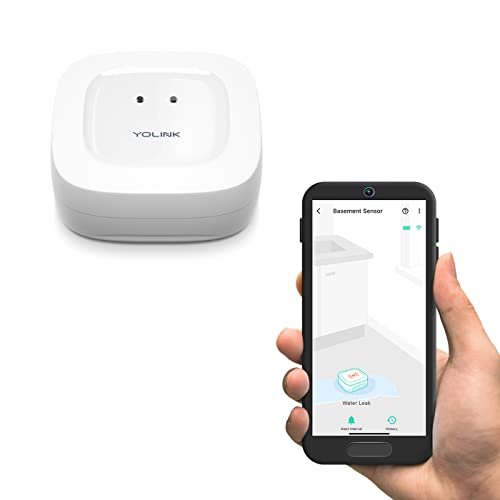
The YoLink Water Leak Sensor takes a different approach from conventional WiFi leak detectors. Instead of connecting each sensor directly to the home's wireless network, YoLink uses LoRa-based communication between its sensors and a compatible YoLink Hub. This gives the system long-range, low-power communication that can reach areas where standard residential WiFi may struggle.
The sensor itself is compact, battery powered, and easy to deploy. It can be placed near toilets, water heaters, washing machines, dishwashers, sinks, sump pumps, aquariums, or other areas where unexpected water could cause damage. For homeowners with larger properties, detached garages, basements, or remote utility spaces, the long-range architecture is one of its strongest advantages.
What Is the YoLink Water Leak Sensor?
The YoLink Water Leak Sensor is a wireless device designed to detect unwanted water and report that event through the YoLink smart-home ecosystem.
Unlike a standard WiFi leak sensor, it does not connect directly to your router.
Instead, the sensor communicates with a compatible YoLink Hub using LoRa-based wireless technology.
The hub then provides access to features such as:
- App notifications
- Battery status
- Device management
- Smart-home automation
This architecture separates the low-power sensor network from the home's regular WiFi network.
Why YoLink Uses LoRa Instead of WiFi
LoRa stands for Long Range radio communication.
It is designed for:
- Long-distance wireless communication
- Low power consumption
- Small amounts of sensor data
- Reliable communication through obstacles
That makes it well suited to devices such as:
- Leak detectors
- Door sensors
- Temperature sensors
- Outdoor monitors
A water leak sensor does not need to stream large amounts of data. It only needs to communicate status changes reliably, so a low-bandwidth long-range protocol makes practical sense.
Up to a Quarter-Mile Open-Air Range
The manufacturer states that YoLink devices can communicate over distances of up to approximately 1/4 mile in open air.
Real-world indoor performance will usually be lower because buildings contain:
- Walls
- Concrete
- Metal
- Appliances
- Floors
- Pipes
Even so, the long-range design can make YoLink particularly useful in areas that are difficult for ordinary WiFi systems to reach.
Useful for Basements and Utility Rooms
Basements are one of the most logical locations for long-range leak detection.
Traditional WiFi can struggle through:
- Concrete floors
- Foundation walls
- Mechanical equipment
A LoRa-based sensor may provide more reliable communication in these environments.
Common basement monitoring locations include:
- Water heater
- Boiler
- Sump pump
- Washing machine
- Utility sink
- Main plumbing lines
Detached Garages and Outbuildings
The long-range system can also be useful beyond the main house.
Potential locations include:
- Detached garages
- Workshops
- Sheds
- Pool equipment rooms
- Remote utility buildings
If plumbing is present in these structures, a leak could go unnoticed for a long time.
A long-range sensor system allows these areas to be monitored without extending conventional WiFi to every building.
A Hub Is Required for Full Functionality
The YoLink Water Leak Sensor requires a compatible YoLink Hub for full smart functionality.
The hub is not included with the sensor described here.
Without the hub, you will not have the normal app-based features such as:
- Remote notifications
- Battery monitoring
- Central device management
This is an important buying consideration.
If you are starting from scratch, factor the cost of a compatible YoLink Hub into the system.
Compatible YoLink Hub Options
YoLink offers different hub options within its ecosystem.
The supplied product information references:
- Standard YoLink Hub
- SpeakerHub models
A SpeakerHub can add audible voice notifications depending on the configuration.
The standard hub is typically sufficient for basic sensor connectivity and app integration.
Why a Hub-Based System Can Be Useful
A hub adds one more component, but it also provides advantages.
Instead of every sensor competing for WiFi access, the low-power sensors communicate through a dedicated wireless network.
That can result in:
- Longer battery life
- More stable multi-device communication
- Better long-range coverage
- Less congestion on the home WiFi network
For a house with many smart sensors, this architecture can be more scalable than using dozens of standalone WiFi devices.
Simple Placement-Based Installation
One of the biggest advantages of the YoLink Water Leak Sensor is installation simplicity.
There is no need to modify plumbing.
The basic process is typically:
- Add the sensor to the YoLink ecosystem.
- Confirm hub communication.
- Place the sensor near a potential leak source.
- Test water detection.
- Confirm notifications.
The sensor can then remain in position until maintenance or battery replacement is needed.
Best Places to Install a Water Leak Sensor
A leak detector should be placed where water is most likely to appear first.
Good locations include:
- Under sinks
- Behind toilets
- Near water heaters
- Behind washing machines
- Near dishwashers
- Beside sump pumps
- Around aquariums
- Near basement plumbing
Correct placement is more important than simply installing many sensors.
Water Heater Leak Monitoring
Water heaters can leak from several areas.
Potential sources include:
- Tank corrosion
- Supply fittings
- Drain valve
- Temperature and pressure relief plumbing
- Nearby pipe joints
A sensor placed beside the heater or within an appropriate drain pan can provide early warning when water begins accumulating.
This is especially useful when the water heater is located:
- Upstairs
- In a finished basement
- Inside a closet
- Near valuable flooring
Washing Machine Protection
Washing machines can release large amounts of water if:
- A supply hose fails
- A drain hose comes loose
- An internal pump leaks
- A seal fails
Placing a sensor behind or beside the machine can provide early notification before water spreads through the laundry area.
Second-floor laundry rooms can benefit particularly from leak monitoring because water may damage the ceiling below.
Dishwasher Monitoring
Dishwashers can develop hidden leaks around:
- Supply hoses
- Drain lines
- Internal pumps
- Door seals
Because much of the appliance is surrounded by cabinets, water may not immediately become visible.
A compact sensor can help detect moisture earlier if there is enough accessible space near the appliance.
Toilet Leak Detection
Toilets can leak from:
- Supply connections
- Shutoff valves
- Tank bolts
- Fill-valve fittings
- Base seals
A sensor can be placed behind or beside the toilet where it remains largely out of sight.
Avoid locations where normal floor cleaning will routinely wet the detector.
Under-Sink Monitoring
Kitchen and bathroom cabinets can conceal slow leaks for extended periods.
Potential sources include:
- Faucet supply lines
- P-traps
- Shutoff valves
- Garbage disposals
- Drain connections
A sensor on the bottom of the cabinet can help identify a leak before water damages cabinetry or flooring.
Sump Pump Monitoring
Sump areas can be difficult to monitor because they are often located in basements.
Potential problems include:
- Pump failure
- Overflow
- Discharge-line issues
- Excessive water accumulation
A long-range sensor can be especially useful here because the location may be far from the home's router.
Aquarium and Fish Tank Monitoring
The product description also suggests placement near aquariums.
Possible leak sources include:
- Filter hoses
- Pumps
- Overflow
- Tank seals
A sensor can provide early warning if water begins collecting around the tank.
Be careful to place it where routine feeding or maintenance splashes do not constantly activate it.
Low-Power Battery Operation
The sensor includes two replaceable AAA batteries.
The manufacturer states that battery life can exceed five years under normal operating conditions.
Actual battery life depends on factors such as:
- Signal conditions
- Frequency of alerts
- Environmental temperature
- Battery quality
The long battery-life claim is one of the main benefits of a low-power LoRa sensor compared with constantly connected WiFi devices.
Batteries Are Included
Unlike many smart sensors that require batteries to be purchased separately, this model includes the two AAA batteries needed for operation.
That allows the sensor to be deployed immediately after setup.
Replaceable Batteries Are a Long-Term Advantage
Replaceable batteries can extend the useful life of a smart sensor.
When the batteries eventually run low, the entire device does not need to be discarded.
Simply replace the cells and continue using the sensor.
The app can also provide battery information when connected through the YoLink Hub.
No Direct WiFi Connection at the Sensor
The sensor itself does not connect directly to the home's WiFi network.
That means you do not need to enter WiFi credentials separately for every sensor.
Instead, the hub handles network connectivity.
This can simplify installation when deploying many devices throughout a property.
Does the System Still Need Internet?
For remote app notifications, the YoLink Hub generally needs internet connectivity.
However, the supplied description highlights YoLink's Control-D2D capability for certain compatible device-to-device automations.
That allows paired YoLink devices to communicate locally over the LoRa-based network without depending entirely on cloud connectivity.
The exact behavior depends on the specific devices and automation configuration.
What Is Control-D2D?
Control-D2D is YoLink's device-to-device communication feature.
Compatible devices can be paired so that one device triggers another directly.
For example, a leak sensor might potentially trigger a compatible shutoff device without requiring cloud processing.
The main advantage is resilience.
A local automation may continue to function even when:
- Internet service is unavailable
- WiFi is unstable
- Cloud services cannot be reached
Exact compatibility should be confirmed before building a safety-critical automation.
Internet Independence Does Not Mean Power Independence
The product description also emphasizes operation during outages, but it is important to distinguish between different components.
The battery-powered sensor can continue operating without AC power.
However, the hub and any powered shutoff device may require:
- Backup battery
- UPS
- Separate power protection
If outage resilience is important, consider the power requirements of the entire automation chain, not only the sensor.
YoLink vs. WiFi Leak Detectors
Both systems can provide smartphone notifications, but their architectures differ.
YoLink LoRa Advantages
- Long communication range
- Excellent battery efficiency
- Better coverage in difficult locations
- Suitable for large sensor networks
- Potential local device-to-device automation
Direct WiFi Advantages
- No proprietary hub required
- Simpler for a single sensor
- Direct connection to existing router
For one detector beside a kitchen sink, WiFi may be perfectly adequate.
For dozens of sensors spread throughout a large property, YoLink's architecture can become much more attractive.
YoLink vs. Zigbee Leak Sensors
Zigbee is another low-power smart-home protocol.
Both Zigbee and YoLink offer advantages over standalone WiFi sensors.
Zigbee typically creates a mesh network where powered devices may relay signals.
YoLink's LoRa-based architecture prioritizes long direct communication range.
The better choice depends on:
- Existing smart-home ecosystem
- Property size
- Number of sensors
- Hub compatibility
If difficult range is the main concern, YoLink has a particularly strong value proposition.
Leak Detection vs. Automatic Water Shutoff
The YoLink Water Leak Sensor itself detects water.
It does not physically close a plumbing valve by itself.
For automatic shutoff, it must be paired with compatible additional equipment.
This distinction is important.
Leak Sensor Alone
It can provide:
- Water detection
- Notifications
- Smart-home triggers
Leak Sensor with Shutoff Device
The system can potentially:
- Detect the leak
- Trigger a valve
- Reduce continued water flow
For high-risk areas, combining detection with automatic shutoff can provide stronger protection.
Sensor Placement Is Critical
Even a long-range sensor cannot detect water that never reaches it.
Place the detector:
- Close to likely leak sources
- On a low surface
- Where water naturally collects
Do not hide it behind an object that diverts water away.
For example, under a sink, position it beneath the supply and drain connections rather than near the cabinet door.
Test the Sensor After Installation
Once installed, perform a controlled detection test according to the manufacturer's instructions.
Verify:
- Sensor activation
- Hub communication
- App notification
- Any configured automation
This confirms that the sensor is not only paired but actually able to report a real leak event.
Test Notifications on Your Phone
Also check your smartphone settings.
Make sure the YoLink app has permission to:
- Send notifications
- Run in the background
- Bypass battery restrictions where appropriate
A sensor cannot protect you effectively if the phone silently suppresses every alert.
Periodic Testing Is Good Practice
Even devices with multi-year battery life should be tested periodically.
Check:
- Battery status
- Sensor response
- Hub connectivity
- Notification delivery
This is especially important for sensors protecting areas where a leak could be costly.
Common Mistakes to Avoid
Buying the Sensor Without a Hub
A compatible YoLink Hub is required for full functionality.
Assuming the 1/4-Mile Range Applies Indoors
Walls and obstacles reduce wireless range.
Placing the Sensor Too Far From the Leak Source
Water must physically reach the sensor.
Never Testing Notifications
Confirm alerts before relying on the system.
Assuming Detection Automatically Stops Water
A separate compatible shutoff device is required.
Ignoring Hub Power During Outages
The sensor may remain powered while the hub does not.
How Many Sensors Should You Install?
There is no universal number.
Start with the highest-risk areas.
A practical priority list might include:
- Water heater
- Washing machine
- Kitchen sink
- Dishwasher
- Toilets
- Basement
- Sump pump
- Refrigerator water line
You can then add sensors to additional areas as needed.
Who Is the YoLink Water Leak Sensor Best For?
The system is particularly well suited to:
- Large homes
- Basements
- Detached garages
- Outbuildings
- Vacation properties
- Smart-home enthusiasts
- Properties with unreliable WiFi coverage
It is especially attractive when long wireless range and battery efficiency are priorities.
Advantages and Considerations
Advantages
- LoRa-based long-range communication
- Up to approximately 1/4-mile open-air range
- Good obstacle penetration
- Very low power consumption
- Long claimed battery life
- Two AAA batteries included
- Easy placement
- Works well in basements and remote structures
- Expandable YoLink ecosystem
- Control-D2D capability with compatible devices
Potential Considerations
A YoLink Hub is required for full functionality.
Real-world range will be lower than open-air specifications.
Remote app notifications depend on hub connectivity.
Automatic water shutoff requires separate compatible hardware.
Battery-life claims vary with usage and environment.
Frequently Asked Questions
Does the YoLink Water Sensor connect directly to WiFi?
No. It communicates with a compatible YoLink Hub using LoRa-based wireless technology.
Is a hub included?
No, according to the supplied product description.
How far can the sensor communicate?
The manufacturer states up to approximately 1/4 mile in open air.
Will it work in a basement?
It is specifically designed for long-range communication and may work better than standard WiFi sensors in difficult locations.
Where can I place it?
Common locations include water heaters, toilets, washing machines, dishwashers, sinks, sump areas, and aquariums.
What batteries does it use?
Two AAA batteries.
Are the batteries included?
Yes.
How long do the batteries last?
The manufacturer states more than five years under typical conditions, though actual battery life can vary.
Can it work without internet access?
Certain compatible YoLink device-to-device automations may operate locally through Control-D2D, but app notifications require hub and network connectivity.
Does it automatically shut off the water?
Not by itself. A compatible shutoff device is required for automatic valve control.
Does it require 2.4 GHz WiFi?
The sensor itself does not connect directly to WiFi. The hub handles network connectivity.
Final Thoughts
The YoLink Water Leak Sensor stands out from conventional smart water alarms because it does not depend on direct WiFi communication at every sensor.
Its LoRa-based architecture provides long range, strong obstacle penetration, and excellent battery efficiency, making it particularly useful in basements, detached garages, utility rooms, sheds, and other places where standard WiFi coverage can be unreliable.
The sensor is also simple to deploy. Place it near a likely leak source, connect it through a compatible YoLink Hub, and configure notifications or automations. The included AAA batteries and claimed multi-year battery life reduce maintenance compared with many always-connected WiFi sensors.
The main consideration is ecosystem dependency. A YoLink Hub is required for full functionality, and automatic water shutoff requires additional compatible hardware.
For homeowners looking for a long-range wireless water leak detector with excellent battery life and coverage beyond ordinary WiFi, the YoLink sensor offers a compelling approach to whole-property leak monitoring.