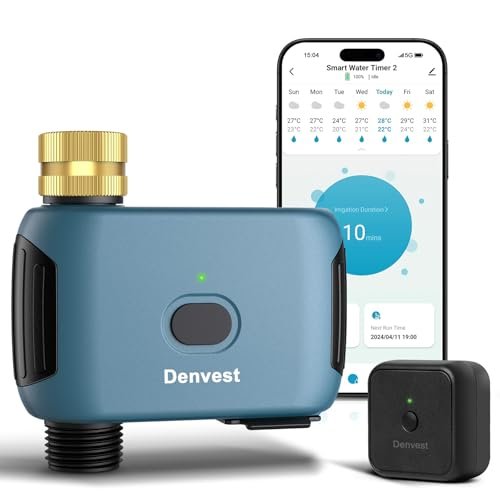
Insoma Smart WiFi Sprinkler Timer Review: App Control, Bluetooth Backup, Cycle & Soak, and Multi-Zone Expansion
A smart sprinkler timer can remove much of the repetitive work from garden watering. Instead of walking outside to adjust a faucet timer every time the weather changes, you can manage schedules remotely, pause watering after rain, and start an unscheduled cycle from your phone.
The Insoma Smart WiFi Sprinkler Timer is designed for hose-fed irrigation systems such as lawns, flower beds, vegetable gardens, greenhouses, and drip irrigation. It combines Smart Life app control with a 2.4 GHz WiFi hub, Bluetooth fallback control, voice commands, normal and Cycle & Soak irrigation modes, watering history, battery alerts, and support for multiple timers.
Its most interesting feature is the combination of connected control and local Bluetooth access. If the WiFi hub loses power, the timer can still be managed from a nearby phone over Bluetooth, provided you are within range.
What Is the Insoma Smart WiFi Sprinkler Timer?
The Insoma timer is a battery-powered smart water valve that connects between an outdoor faucet and a hose or irrigation line.
According to the supplied product information, it supports:
- Smart Life app control
- 2.4 GHz WiFi through a hub
- Bluetooth control
- Watering-history records
- Alexa compatibility
- Google Assistant compatibility
- Normal irrigation schedules
- Cycle & Soak watering
- Manual watering
- 24-, 48-, and 72-hour weather delays
- Up to 20 schedules per timer
- Up to 32 timers per WiFi hub
- Shared app access for family members
- Low-battery notifications
- IP55-rated outdoor protection
- UV-resistant and rust-resistant exterior materials
The timer requires four AAA alkaline batteries, which are not included.
Smart Life App Control
The Smart Life app is the primary interface for configuring and managing the timer.
Once the timer and hub are paired, you can use the app to:
- Create watering schedules
- Start or stop irrigation
- Review watering history
- Adjust settings
- Monitor battery status
Remote app control is especially useful if the outdoor faucet is far from the house or if you are traveling.
2.4 GHz WiFi Through a Hub
The system uses a WiFi hub rather than connecting the timer directly to the router.
The hub needs access to a 2.4 GHz WiFi network.
This is a common design for battery-powered outdoor devices because the hub can handle the internet connection while the timer communicates locally.
Why Hub-Based Connectivity Can Be Useful
A hub can make it easier to manage several irrigation timers from one connected system.
It also allows the outdoor timer to avoid maintaining its own constant direct WiFi connection, which may help reduce battery consumption.
The tradeoff is that the hub needs continuous power for remote WiFi control.
Bluetooth as a Backup Control Method
The Insoma timer also supports Bluetooth control through the Smart Life app.
This is a useful fallback if the home loses power and the WiFi hub stops working.
You can still connect directly to the timer from a nearby smartphone and adjust watering programs.
Bluetooth Range
The supplied information lists a maximum open-area Bluetooth range of approximately 60 to 70 feet.
Real-world range may be shorter because of:
- Exterior walls
- Metal structures
- Appliances
- Landscaping
Treat the stated range as a best-case open-area figure rather than a guarantee.
Why Bluetooth Backup Matters
A smart watering system that depends only on WiFi can become difficult to manage during an internet or power outage.
Bluetooth provides another local control path.
That does not mean you can control the timer from far away during an outage, but it can preserve nearby access.
Watering History
The Smart Life app can display watering history according to the supplied description.
This makes it easier to verify whether irrigation actually ran as expected.
Historical records can be useful for identifying:
- Missed cycles
- Changes in frequency
- Excessive watering
- Seasonal patterns
Use History to Improve Your Schedule
Watering records are most useful when compared with actual soil and plant conditions.
If the landscape remains healthy with shorter or less frequent watering, you may be able to reduce irrigation further.
If plants consistently dry out before the next scheduled cycle, the program may need to be adjusted.
Normal Irrigation Mode
In normal mode, the timer opens at a scheduled time and waters for a specified duration.
You can customize:
- Start time
- Irrigation duration
- Days of the week
This is suitable for straightforward watering tasks such as:
- Hose-fed sprinklers
- Flower beds
- Drip lines
- Soaker hoses
Cycle & Soak Mode
The second major irrigation mode is Cycle & Soak.
Instead of applying water continuously, the timer alternates watering periods with pause periods within a defined time window.
This is especially useful when soil absorbs water slowly.
Why Cycle & Soak Can Reduce Runoff
If sprinklers deliver water faster than the soil can absorb it, excess water may run across the surface instead of soaking into the root zone.
Cycle & Soak can help by giving the soil time to absorb water between applications.
It can be particularly useful on:
- Clay soil
- Compacted lawns
- Slopes
- Areas prone to puddling
Example of Cycle & Soak
Suppose a lawn needs 24 minutes of irrigation.
Instead of watering continuously for 24 minutes, the timer could divide the session into shorter cycles separated by soak periods.
The ideal pattern depends on:
- Soil type
- Slope
- Sprinkler output
- Root depth
The goal is to reduce runoff, not simply create more frequent watering.
Up to 20 Schedules Per Timer
One Insoma timer can reportedly store up to 20 watering schedules.
The source divides those into:
- 10 normal schedules
- 10 Cycle & Soak schedules
That offers considerably more flexibility than a basic digital hose timer.
Avoid Overlapping Schedules
More scheduling capacity is useful, but it also makes accidental overwatering easier.
Review all active programs carefully.
If several schedules target the same watering period, the garden may receive more water than intended.
Use only the number of schedules that solve a real irrigation need.
Manual Watering
Manual mode allows you to start watering without altering the normal program.
The supplied description lists manual watering durations from approximately 1 minute to 24 hours.
This can be useful for:
- New plants
- Fertilizer application
- Unusually hot weather
- Testing irrigation lines
Once manual watering ends, the preset schedule remains available.
Weather Delay
The timer includes temporary weather-delay settings of:
- 24 hours
- 48 hours
- 72 hours
This lets you pause scheduled watering after rainfall without deleting the existing program.
Once the delay expires, normal irrigation resumes automatically.
Why Weather Delay Is Practical
A manual pause is often easier than turning the whole system off.
If you simply disable watering, you may forget to reactivate it.
A defined delay provides a temporary interruption and automatic return to normal scheduling.
Weather Delay Is Not Automatic Soil Sensing
A weather delay still depends on user judgment.
The timer does not directly know whether the soil is wet enough.
A shaded flower bed and a sunny container garden can respond very differently to the same rainfall.
Use the delay according to actual local conditions.
Alexa Voice Control
The timer is advertised as compatible with Amazon Alexa.
That can provide convenient hands-free control for simple actions such as starting or stopping irrigation.
Voice control is best suited to quick commands rather than detailed program configuration.
Google Assistant Compatibility
Google Assistant support is also listed.
As with Alexa, the main value is convenience.
Complex schedules are generally easier to manage in the Smart Life app, where you can review durations, days, and watering modes visually.
Scale Up to 32 Timers
One WiFi hub can reportedly control up to 32 Insoma water timers.
That makes the system potentially useful for much larger hose-fed irrigation setups.
A property could theoretically assign different timers to:
- Front lawn
- Backyard
- Vegetable beds
- Flower borders
- Greenhouse
- Patio planters
- Shrub zones
while managing them through one Smart Life ecosystem.
Large-Scale Expansion Requires Planning
The ability to connect 32 timers does not mean most homes need anywhere near that number.
A larger installation should consider:
- Available water pressure
- Faucet locations
- Hub range
- Hose routing
- App organization
A multi-timer system can become complicated quickly if zones are not clearly named and documented.
Share Irrigation Control With Family Members
The Smart Life app can reportedly share home-management access with other family members.
This can be useful when more than one person is responsible for garden care.
Shared access means irrigation does not depend entirely on one person's phone.
Battery Requirements
The timer requires four AAA 1.5-volt alkaline batteries according to the supplied description.
The batteries are not included.
The source contains two different battery-life claims: one says up to approximately one year, while another says more than six months. These statements are not necessarily incompatible, because actual runtime can vary substantially with usage and conditions.
What Affects Battery Life?
Battery runtime may depend on:
- Number of valve operations
- Bluetooth and wireless activity
- Outdoor temperature
- Battery quality
- Frequency of schedule changes
Treat maximum runtime claims as estimates rather than guaranteed replacement intervals.
Low-Battery Alerts
When battery level falls below approximately 20%, the app can send a replacement reminder according to the supplied description.
This is especially useful if the timer is responsible for watering while you are away.
Check Batteries Before Travel
If the system will be operating unattended for several days or weeks, check battery status beforehand.
Replacing weak batteries before leaving is safer than depending entirely on a low-battery alert after you are already away.
IP55 Outdoor Protection
The timer is described as IP55 rated.
That means it is designed to resist dust and water exposure within the limits of that rating.
It is appropriate for normal outdoor use, but it should not be treated as waterproof for submersion.
Avoid locations where:
- Water pools
- Flooding occurs
- The device could become fully immersed
UV-Resistant Exterior
The housing includes a UV-resistant coating according to the source.
That is useful because outdoor faucet timers are exposed to sunlight for long periods.
UV resistance may help slow degradation of the plastic housing.
Rust-Resistant Materials
The timer body uses rust-resistant materials, including ABS plastic.
Plastic itself does not rust, which can be an advantage outdoors.
Metal fittings and internal components still benefit from sensible care and storage.
Sealed Battery Cover
A sealing ring is built into the battery compartment to help keep moisture away from the electronics.
Make sure the battery cover is closed correctly after replacement.
The seal can only protect the compartment effectively if the housing is fully secured.
Installation Overview
A typical installation looks like:
Outdoor faucet → Insoma timer → hose or irrigation system
Then:
- Install four AAA batteries.
- Connect the timer to the faucet.
- Connect the watering line.
- Power the WiFi hub.
- Connect the hub to 2.4 GHz WiFi.
- Add the timer through the Smart Life app.
- Create watering schedules.
Follow the current manufacturer instructions for exact pairing steps.
Check Connections for Leaks
Once the faucet is turned on, inspect:
- Inlet connection
- Outlet connection
- Hose fittings
Even a small leak can waste water continuously because the faucet generally remains pressurized.
Reduce Mechanical Stress
A heavy hose can pull downward on a faucet-mounted timer.
Where practical, support the hose or route it so its full weight does not hang directly from the timer.
This can help reduce strain on the housing and threaded connection.
Drip Irrigation May Need Pressure Regulation
Many drip systems operate at lower pressure than a standard outdoor faucet.
The supplied description does not state that a pressure regulator is included.
Use one if required by the connected irrigation components.
Filter Maintenance
If the system includes a screen filter or if you add one downstream, inspect it periodically.
Sediment can reduce flow and clog small drip emitters.
Good filtration is particularly important for micro-irrigation.
Best Applications
Lawn Sprinklers
Use normal or Cycle & Soak schedules depending on soil absorption.
Vegetable Gardens
Automate drip lines or soaker hoses with regular schedules.
Greenhouses
Repeated or cyclical watering can be useful where plants need consistent moisture.
Flower Beds
Create dedicated watering programs without relying on hand watering.
Patio Containers
Connect several containers through a small drip system.
Smart Hose Timer vs. Mechanical Timer
Mechanical Timer Advantages
- Simpler setup
- No WiFi
- No hub
- Fewer electronics
Insoma Smart Timer Advantages
- Remote app control
- Bluetooth backup
- Watering history
- Voice control
- Cycle & Soak
- Weather delay
- Multi-timer expansion
The smart version makes sense when these extra features are useful enough to justify the added complexity.
Smart Hose Timer vs. In-Ground Irrigation Controller
A hose timer controls water at an outdoor faucet.
An in-ground controller operates wired 24 VAC irrigation valves.
Choose the Insoma timer for:
- Hose sprinklers
- Drip systems
- Soaker hoses
- Greenhouse irrigation
Choose a conventional sprinkler controller for a permanent underground multi-zone system.
Common Mistakes
Using a 5 GHz-Only Network
The hub requires 2.4 GHz WiFi.
Assuming Bluetooth Works From Anywhere
Bluetooth is a local connection with limited range.
Creating Too Many Overlapping Schedules
Twenty schedules are available, but fewer is often easier to manage.
Ignoring Low-Battery Notifications
Replace batteries before the valve becomes unreliable.
Treating IP55 as Submersible
The timer should not be placed where it can become immersed.
How to Create a Better Watering Schedule
Start with the landscape rather than the app.
Observe:
- Soil type
- Sun exposure
- Plant requirements
- Runoff
- Natural rainfall
Use normal watering where the soil absorbs water well.
Use Cycle & Soak where continuous irrigation produces runoff.
Then review watering history and make adjustments over time.
Adjust With the Seasons
A schedule that works during summer may be excessive in cooler weather.
Even with a smart timer, irrigation should be reviewed as:
- Temperatures change
- Rainfall increases
- Plants mature
Automation makes schedule changes easier, but it does not eliminate the need for observation.
Advantages and Considerations
Advantages
- Smart Life app control
- 2.4 GHz WiFi hub
- Bluetooth backup control
- Watering-history records
- Alexa compatibility
- Google Assistant compatibility
- Normal irrigation mode
- Cycle & Soak irrigation
- Manual watering from 1 minute to 24 hours
- 24-, 48-, and 72-hour weather delays
- Up to 20 schedules per timer
- Up to 32 timers per hub
- Shared family access
- Low-battery alerts
- IP55 outdoor protection
Potential Considerations
- WiFi hub must remain powered for remote internet control
- Bluetooth range is limited
- Four AAA batteries are required
- Battery-life estimates vary with usage
- IP55 does not mean submersible
- Large multi-timer systems require careful planning
Frequently Asked Questions
Does the Insoma timer require a WiFi hub?
Yes. The supplied description refers to an included or compatible WiFi hub for remote connectivity.
What WiFi frequency does it use?
2.4 GHz.
Can I still control it if the hub loses power?
Nearby Bluetooth control is supported through the Smart Life app according to the source.
What is the stated Bluetooth range?
Approximately 60 to 70 feet in an unobstructed open area.
Does it keep watering history?
Yes.
Does it work with Alexa?
Yes, according to the supplied description.
Does it work with Google Assistant?
Yes.
What watering modes are available?
Normal scheduling and Cycle & Soak.
Can I water manually?
Yes, from approximately 1 minute to 24 hours.
Does it support rain or weather delay?
Yes, for 24, 48, or 72 hours.
How many watering schedules can I create?
Up to 20 per timer: 10 normal and 10 Cycle & Soak schedules according to the source.
How many timers can one hub support?
Up to 32 according to the supplied description.
Can family members share control?
Yes, Smart Life home management can reportedly be shared.
What batteries does it use?
Four AAA 1.5-volt alkaline batteries.
Are batteries included?
No.
Will the app warn me about low batteries?
Yes. The source states that an alert is sent when battery level drops below about 20%.
Is the timer waterproof?
It is described as IP55 rated, which is suitable for normal outdoor exposure but not submersion.
Final Thoughts
The Insoma Smart WiFi Sprinkler Timer offers a useful mix of remote control, local fallback access, flexible irrigation scheduling, and large-system scalability.
Its most distinctive feature is the combination of hub-based WiFi control and nearby Bluetooth access. That gives users a way to manage the timer locally even if the home hub is unavailable. Normal watering, Cycle & Soak, manual operation, weather delays, watering history, voice-assistant support, and low-battery notifications further expand its usefulness beyond a conventional hose timer.
The main tradeoffs are the dependency on a powered hub for remote internet control, the limited range of Bluetooth, and the need to maintain four AAA batteries. Large installations with many timers also require careful organization and adequate water supply.
For homeowners looking for a smart hose timer with Smart Life control, Bluetooth backup, Cycle & Soak watering, weather delay, voice assistants, watering history, low-battery alerts, and multi-timer expansion, the Insoma system provides a flexible platform for automating lawns, gardens, greenhouses, and drip irrigation.