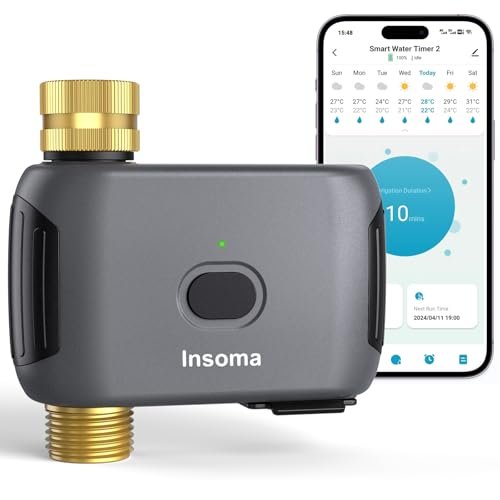
Insoma WiFi Water Timer Review: Gateway-Free Smart Hose Irrigation With App, Voice, and Cycle & Soak Control
Smart hose timers are useful when you want automated watering without installing a full in-ground irrigation system. They can handle routine watering for lawns, vegetable beds, greenhouses, patio plants, and drip systems while reducing the need to walk outside and adjust a mechanical dial every time the weather changes.
The Insoma WiFi Water Timer is designed to simplify that setup by connecting directly to a 2.4 GHz WiFi network without requiring a separate gateway. It works with the Smart Life app, supports remote control and voice commands, offers both standard and Cycle & Soak irrigation modes, and can store multiple watering schedules for different outdoor needs.
Its strongest appeal is convenience. Because the timer connects directly to WiFi, there is one less hub to install and manage. At the same time, the system still offers more advanced functions than a basic digital timer, including weather delays, irrigation history, shared family access, and up to 20 programmed schedules.
What Is the Insoma WiFi Water Timer?
The Insoma timer is a smart hose-faucet controller that attaches between an outdoor water source and a connected hose or irrigation line.
According to the supplied product information, it includes:
- Direct 2.4 GHz WiFi connectivity
- No separate gateway requirement
- Smart Life app control
- Remote watering management
- Watering-history access
- Alexa compatibility
- Google Assistant compatibility
- Manual watering
- Weather delay
- Normal irrigation mode
- Cycle & Soak mode
- Up to 20 watering schedules
- Shared app access for family members
- Brass inlet and outlet
- IP55-rated enclosure
- UV-resistant exterior
- Working pressure from approximately 7.26 to 116 PSI
- Four-AA-battery power
This makes it a relatively feature-rich option for a single hose-fed irrigation circuit.
Direct WiFi Without a Gateway
One of the most important differences between this timer and many competing smart hose controllers is that it does not require a separate WiFi bridge or hub.
The timer connects directly to a compatible 2.4 GHz WiFi network.
That simplifies installation and reduces the number of devices needed indoors.
Why a Gateway-Free Design Can Be Convenient
A dedicated gateway adds another component that needs:
- Power
- Placement
- Pairing
- Troubleshooting
Removing that layer can make a smart timer easier to deploy, particularly for someone automating only one outdoor faucet.
A direct WiFi design can also reduce the upfront hardware required.
Direct WiFi Has Tradeoffs
The outdoor timer itself must have a reliable connection to the home's WiFi network.
That can become challenging if the faucet is:
- Far from the router
- Behind thick masonry
- On the opposite side of the house
- Near metal siding or utility equipment
Before relying on remote irrigation, verify that the outdoor location receives dependable 2.4 GHz coverage.
Why 2.4 GHz Is Used
The supplied description specifies 2.4 GHz WiFi.
This frequency is common among outdoor and smart-home products because it generally reaches farther and penetrates walls better than 5 GHz.
If your router broadcasts both frequencies, make sure the 2.4 GHz network remains available during setup.
Smart Life App Control
The timer connects through the Smart Life app.
Once configured, users can manage watering remotely rather than relying only on the timer's physical controls.
The app can be used to:
- Create watering programs
- Change schedules
- Start or stop irrigation
- Review watering history
This can make garden management much easier when the outdoor faucet is inconvenient to access.
Remote Control While Away From Home
Connected irrigation becomes especially useful when you are traveling or away during the day.
If the weather changes or a garden needs additional water, you can adjust the timer without being physically present.
That is one of the clearest advantages over a traditional mechanical timer.
Watering History
The app also allows users to review watering history according to the supplied description.
Historical records can help you understand whether irrigation is actually running as expected.
They can also make it easier to compare:
- Watering frequency
- Schedule changes
- Seasonal adjustments
A history log is useful when trying to optimize a watering routine rather than simply letting the timer run indefinitely.
Alexa Voice Control
The Insoma timer is marketed as compatible with Amazon Alexa.
That allows simple watering actions to be triggered using voice commands through a compatible smart-home setup.
Voice control is particularly convenient when you want to start or stop irrigation quickly.
Google Assistant Compatibility
Google Assistant support is also listed.
As with Alexa, voice control is most useful for simple commands.
Complex schedule configuration is usually easier to manage in the Smart Life app.
Manual Watering Mode
The timer supports manual watering without requiring the normal recurring schedule to be changed.
The supplied description states that a manual session can run from approximately 1 minute to 24 hours.
This gives users substantial flexibility.
When Manual Watering Is Useful
Manual mode can help when:
- New plants have just been installed
- Soil is unusually dry
- Fertilizer needs watering in
- A greenhouse needs an extra cycle
- A lawn has been reseeded
Because the normal program stays intact, you do not need to rebuild the schedule afterward.
Weather Delay
The timer also offers temporary watering suspension through a weather-delay feature.
According to the supplied information, irrigation can be paused for:
- 24 hours
- 48 hours
- 72 hours
After the selected delay ends, the programmed schedule resumes automatically.
Why Weather Delay Is Practical
A temporary pause is more convenient than deleting or disabling a schedule after rainfall.
You can suspend watering and let the timer resume automatically later.
This reduces the chance of forgetting to turn irrigation back on.
Weather Delay Is Manual, Not Predictive
The source describes a delay function rather than automatic weather intelligence.
That means the user should still assess whether conditions justify pausing irrigation.
For example, one brief shower may not provide enough water to replace a full scheduled irrigation cycle.
Normal Irrigation Mode
In normal mode, the timer follows a conventional schedule.
Users can configure:
- Start time
- Watering duration
- Day of the week
This works well for irrigation systems that benefit from one continuous watering period.
Typical uses include:
- Hose-fed sprinklers
- Small garden beds
- Basic drip zones
Cycle & Soak Mode
The second irrigation method is Cycle & Soak.
Instead of watering continuously, the timer repeatedly waters and pauses within a defined time window.
This is useful when the soil cannot absorb water as quickly as the irrigation system applies it.
Why Cycle & Soak Can Improve Irrigation
Continuous watering can sometimes lead to runoff.
This is common on:
- Sloped lawns
- Compacted soil
- Heavy clay
Cycle & Soak allows water to infiltrate between applications.
That can help more water reach the root zone rather than flowing away across the surface.
Example of Cycle & Soak Use
Instead of running a sprinkler continuously for 30 minutes, you might divide the watering into several shorter cycles separated by pauses.
The exact timing should depend on how quickly the soil absorbs water.
The goal is not simply to create more cycles, but to reduce runoff and improve infiltration.
Up to 20 Watering Schedules
The timer can reportedly store as many as 20 schedules.
The supplied description divides these into:
- 10 normal schedules
- 10 Cycle & Soak schedules
That is far more flexibility than most simple hose timers provide.
Why Multiple Schedules Matter
Multiple schedules can be useful when watering needs change across the week.
For example, you might create separate programs for:
- Morning irrigation
- Weekend deep watering
- Seasonal routines
However, too many overlapping schedules can become confusing.
Use only as many programs as the landscape actually needs.
Avoid Accidental Schedule Overlap
When a timer supports many programs, it becomes easier to accidentally water more often than intended.
Review all active schedules carefully.
Make sure two programs are not running the same irrigation circuit back-to-back unless that behavior is intentional.
Shared Family Access
The Smart Life app allows home or device access to be shared with family members according to the supplied description.
This can be useful when several people manage the same garden.
Instead of relying on one person's phone, multiple household members can potentially check or control irrigation.
Good Applications for the Timer
The Insoma timer is marketed for a broad range of outdoor water uses.
Lawn Sprinklers
It can automate a hose-fed sprinkler on a recurring schedule.
Vegetable Gardens
It can control drip tubing, soaker hoses, or other irrigation lines.
Greenhouses
Automated schedules can help maintain a more consistent watering routine.
Flower Beds
A dedicated hose or drip line can run without daily manual intervention.
Patio Plants
Containers can be connected through a small drip system.
Swimming Pool Applications
The source also mentions swimming pools.
This should be interpreted conservatively.
A hose timer may be useful for certain water-fill tasks, but it should not be assumed suitable for controlling pool circulation, filtration, or chemical systems.
Use it only for applications consistent with the manufacturer's instructions.
Brass Inlet and Outlet
The timer uses brass threaded connections on both inlet and outlet according to the supplied description.
This is a notable durability feature.
Threaded faucet connections experience repeated mechanical stress from:
- Installation
- Hose weight
- Removal
- Reconnection
Metal threads may be more resistant to deformation than lightweight plastic alternatives.
Why Brass Connections Can Matter
Plastic threads can be damaged by:
- Cross-threading
- Overtightening
- Repeated installation
Brass is generally more robust under normal mechanical use.
That does not eliminate the need to install fittings carefully.
Leak Prevention Still Requires Proper Setup
Even with brass connections, inspect the timer after installation.
Make sure:
- Washers are seated
- Threads are aligned
- Connections are not overtightened
A smart timer is often left under constant upstream pressure, so even a small leak can waste water continuously.
Working Pressure Range
The supplied specifications list a working water-pressure range of approximately 7.26 to 116 PSI.
That provides a broad operating range for typical residential faucet applications.
However, the irrigation equipment connected downstream may have a lower pressure requirement.
Drip Systems May Need a Pressure Regulator
Many drip emitters and micro-irrigation components are designed for reduced pressure.
Even if the timer itself tolerates 116 PSI, that does not mean a drip system should operate at that pressure.
Use a suitable regulator when required by the irrigation hardware.
IP55 Water and Dust Protection
The timer is described as IP55 rated.
That indicates protection against dust ingress and water jets appropriate to the rating.
It is designed for outdoor use, but IP55 does not mean the device should be submerged.
Avoid installing it where standing water can collect around the housing.
UV-Resistant Exterior
The supplied description also mentions an anti-UV coating.
Outdoor equipment is exposed to prolonged sunlight, which can gradually degrade plastics.
UV-resistant construction may help improve durability over time.
ABS Housing
The timer body is made from anti-rust ABS plastic according to the source.
Plastic has the advantage of not rusting like ferrous metal.
The combination of a plastic enclosure and brass threads attempts to balance lower weight with stronger connection points.
Sealed Battery Compartment
The battery compartment includes a sealing strip intended to reduce water intrusion.
This is useful because batteries and electronics are vulnerable to moisture.
Always make sure the battery cover is closed properly before leaving the timer outdoors.
Four AA Batteries Required
The timer runs on four 1.5-volt AA alkaline batteries, which are not included.
The source claims battery life of up to approximately one year.
Actual runtime can vary according to:
- Wireless activity
- Valve usage
- Temperature
- Battery quality
Treat the one-year figure as a potential maximum rather than a guaranteed replacement interval.
Battery Maintenance
Inspect battery condition periodically.
If the timer is responsible for watering plants during travel, consider installing fresh batteries beforehand.
Avoid mixing:
- Old and new batteries
- Different battery chemistries
unless the manufacturer specifically allows it.
Installation
Installation should be relatively straightforward.
A typical arrangement is:
Outdoor faucet → Insoma smart timer → hose or irrigation system
The timer is then connected to the Smart Life app and configured on the 2.4 GHz WiFi network.
Test Before Creating Schedules
Before automating irrigation, manually open the valve and inspect:
- Faucet connection
- Outlet connection
- Hose
- Irrigation line
Make sure water reaches the intended area and shuts off properly.
Reduce Mechanical Stress on the Timer
A long or heavy garden hose can pull on the faucet-mounted timer.
Where possible, support or route the hose so that its full weight is not hanging from the valve body.
This can help protect threaded connections.
Smart WiFi Timer vs. Basic Digital Timer
A basic timer may still be a better choice for someone who wants minimal complexity.
Basic Timer Advantages
- No WiFi
- No app
- Lower setup complexity
Insoma Smart Timer Advantages
- Remote control
- Voice assistants
- Watering history
- Cycle & Soak
- Weather delay
- Multiple schedules
- Shared access
The smart model is most worthwhile when these additional controls are actually useful.
Gateway-Free WiFi vs. Hub-Based Smart Timers
There are two common approaches to smart hose timers.
Direct WiFi
Advantages:
- No gateway
- Fewer devices
- Simpler single-timer setup
Potential limitation:
- Timer must receive reliable WiFi outdoors
Hub-Based System
Advantages:
- Gateway may improve communication architecture
- Easier expansion in some ecosystems
Potential limitation:
- Extra hardware required
The Insoma design favors simplicity through direct WiFi.
Common Mistakes
Assuming It Supports 5 GHz WiFi
The source specifies 2.4 GHz.
Using Too Many Overlapping Schedules
Twenty programs are available, but that does not mean all should be active.
Ignoring Downstream Pressure Requirements
Drip systems may need regulation.
Treating IP55 as Waterproof for Submersion
It should still be protected from standing water.
Forgetting Batteries Are Sold Separately
Four AA alkaline batteries are required.
How to Build a Better Watering Schedule
Start with the landscape rather than the timer.
Observe:
- Soil moisture
- Plant type
- Sun exposure
- Runoff
- Seasonal weather
Then choose either normal or Cycle & Soak irrigation based on how the soil behaves.
If water begins running off before the root zone is properly wet, Cycle & Soak may be the better choice.
Water Conservation Tips
Automation is only efficient when the underlying schedule is appropriate.
Periodically check for:
- Leaking hoses
- Broken emitters
- Overspray
- Saturated soil
Reduce watering when natural rainfall is sufficient.
The weather-delay function can make temporary adjustments easier.
Advantages and Considerations
Advantages
- Direct 2.4 GHz WiFi
- No gateway required
- Smart Life app control
- Remote watering
- Watering history
- Alexa compatibility
- Google Assistant compatibility
- Manual watering
- 24-, 48-, and 72-hour weather delay
- Normal watering mode
- Cycle & Soak mode
- Up to 20 schedules
- Shared family access
- Brass inlet and outlet
- IP55-rated enclosure
- UV-resistant exterior
- Wide stated pressure range
Potential Considerations
Requires reliable outdoor WiFi coverage.
Only 2.4 GHz connectivity is specified.
Four AA batteries are required and not included.
Battery-life claims vary with conditions.
Drip systems may still need filtration and pressure regulation.
Frequently Asked Questions
Does the Insoma timer require a gateway?
No. The supplied description states that it connects directly to WiFi.
What WiFi frequency does it use?
2.4 GHz.
Can I control it remotely?
Yes, through the Smart Life app.
Does it support Bluetooth?
The source for this version emphasizes direct WiFi operation rather than switching between WiFi and Bluetooth.
Can I review watering history?
Yes, according to the supplied description.
Does it work with Alexa?
Yes.
Does it work with Google Assistant?
Yes.
Can I water manually?
Yes, for approximately 1 minute to 24 hours.
Does manual watering change the programmed schedule?
The source states that manual watering can be used without disrupting preset programs.
Does it support rain delay?
Yes, for 24, 48, or 72 hours.
What is Cycle & Soak?
It alternates watering and pause periods within a defined window to help reduce runoff and improve soil absorption.
How many schedules can I create?
Up to 20 total according to the supplied information: 10 normal and 10 Cycle & Soak schedules.
Can multiple people control the timer?
The Smart Life app can support shared home-management access according to the source.
What water pressure does it support?
Approximately 7.26 to 116 PSI according to the supplied specifications.
Are the hose connections plastic?
The source specifies brass inlet and outlet connections.
What batteries does it use?
Four AA 1.5-volt alkaline batteries.
Are the batteries included?
No.
Final Thoughts
The Insoma WiFi Water Timer stands out primarily for combining direct WiFi connectivity with a relatively broad set of irrigation controls.
Its gateway-free design simplifies a single-timer installation, while Smart Life remote control, Alexa and Google Assistant support, manual watering, weather delay, Cycle & Soak programming, watering history, and up to 20 schedules provide considerably more flexibility than a conventional faucet timer.
The brass inlet and outlet, IP55 enclosure, and wide stated pressure range also make the hardware more interesting for repeated outdoor use. The main consideration is network coverage: because the timer connects directly to WiFi, the outdoor faucet needs a stable 2.4 GHz signal.
For homeowners looking for a gateway-free smart WiFi hose timer with Smart Life app control, Alexa and Google Assistant support, Cycle & Soak irrigation, weather delay, multiple schedules, and durable brass hose connections, the Insoma timer provides a flexible approach to automating lawn, garden, greenhouse, and drip irrigation.