Smart WiFi Water Leak Detector System Review: Tuya Alerts, Drip and Flood Detection, and Up to 24 Sensors
Water leaks can begin with something as small as a slow drip beneath a faucet or as serious as a failed washing-machine hose. In either case, early detection matters. The longer water is allowed to spread unnoticed, the greater the risk of damage to flooring, cabinets, drywall, furniture, and nearby rooms.
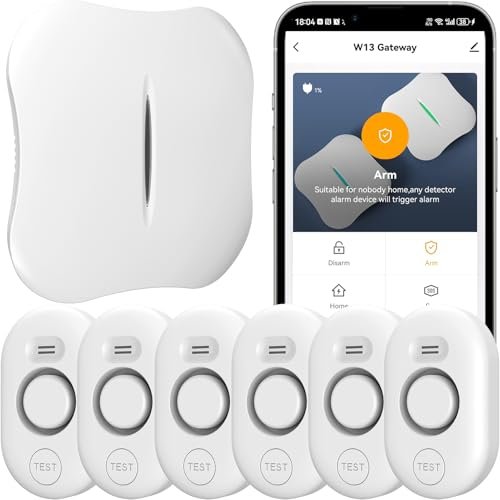
This smart water leak detection system is designed to provide both local alarms and remote smartphone notifications. It combines a 2.4 GHz WiFi gateway with compatible WD61 leak sensors that can detect water from above and below. The gateway connects to the Tuya Smart app, allowing users to receive alerts, rename devices, adjust alarm settings, and monitor multiple sensors from a central interface.
One of the system's strongest features is scalability. A single gateway can reportedly support up to 24 WD61 sensors with a stated wireless transmission range of up to 328 feet (100 meters) under favorable conditions. That makes it potentially useful for homes where several bathrooms, appliances, utility spaces, and basement areas need to be monitored at the same time.
What Is This Smart Water Leak Detection System?
This is a hub-based leak monitoring system built around a WiFi-connected gateway and compatible wireless leak sensors.
The gateway handles the smart-home connection, while the individual sensors are placed in areas vulnerable to leaks.
The system is designed to provide:
- Local water alarms
- Smartphone notifications
- Drip detection
- Floor-flood detection
- Multi-sensor monitoring
- Remote alarm configuration
- Tuya Smart app management
This gives it more flexibility than a basic standalone water alarm.
How the System Works
The leak sensors communicate wirelessly with the gateway.
When a sensor detects water, the system can trigger a local alarm and report the event through the gateway to the Tuya Smart app.
The general process is:
- A sensor detects water.
- The sensor activates its local alarm.
- The gateway receives the event.
- The gateway can sound its own configured alarm.
- A notification is sent through the Tuya Smart app.
This combination provides both local and remote warning.
2.4 GHz WiFi Gateway
The gateway connects to a 2.4 GHz WiFi network.
It does not support 5 GHz WiFi according to the supplied product information.
This is common with smart-home devices because 2.4 GHz typically offers better range and better penetration through walls than higher-frequency WiFi.
Before purchasing, make sure your router supports 2.4 GHz.
What If Your Router Uses Both 2.4 GHz and 5 GHz?
Many modern routers broadcast both frequencies using the same network name.
In some cases, setup will work normally.
If pairing fails, you may need to:
- Temporarily separate the bands
- Connect your phone to 2.4 GHz during setup
- Disable band steering
- Follow the manufacturer's router-specific instructions
Once connected, the gateway handles communication between the home's network and the sensors.
Tuya Smart App Notifications
When a leak is detected, the gateway can send a notification through the Tuya Smart app.
The product is described as compatible with both:
- iOS
- Android
This allows users to receive warnings when they are away from home.
That can be particularly useful when you are:
- At work
- Traveling
- Sleeping
- Away for the weekend
- Monitoring a rental property
Push Notifications Are Free
The source makes an important distinction between standard app notifications and optional paid services.
Regular Tuya push notifications are described as free.
These may appear:
- In the phone notification bar
- On the lock screen
- Inside the Tuya app
This is generally enough for most users who simply want remote leak alerts.
SMS and Phone Call Alerts May Cost Extra
The product description states that SMS and call alerts are offered through a third-party Tuya service and may require payment.
That means users should not assume text messages and telephone calls are included with the product.
If standard push notifications are sufficient, there may be no reason to enable those extra services.
Drip Detection from Above
The WD61 sensor includes a top-mounted drip detector.
This is useful when water may fall directly onto the sensor rather than accumulating underneath it.
Possible applications include:
- Roof leaks
- Faucet drips
- Pipe condensation
- Plumbing joints
- Sink plumbing
A top sensor can provide an earlier alert in situations where water begins dripping before a puddle forms.
Flood Detection from Below
The sensor also uses four bottom probes for floor-level water detection.
These probes are designed to activate when water collects beneath the sensor.
This makes the detector suitable for leaks around:
- Washing machines
- Water heaters
- Toilets
- Sinks
- Bathtubs
- Dishwashers
Combining top and bottom detection gives the sensor more versatility than devices that only detect water on the floor.
Why Dual-Sided Detection Is Useful
Not all leaks behave the same way.
Some problems create a slow drip from above.
Others release water that spreads across the floor.
A sensor capable of monitoring both conditions can react to more types of failures.
For example, beneath a sink, the top detector may catch water dripping from a supply connection before enough water accumulates to reach the floor probes.
Up to 24 Sensors per Gateway
The W13 gateway can reportedly support up to 24 WD61 leak sensors.
That makes the system suitable for larger monitoring setups.
Rather than installing unrelated standalone alarms, users can monitor many locations through one gateway and one app.
A 24-sensor capacity is more than most average homes will need, but it provides room to expand.
Example Whole-Home Sensor Layout
A larger home might distribute sensors across:
- 2 bathrooms
- Kitchen sink
- Dishwasher
- Refrigerator water line
- Washing machine
- Water heater
- Basement
- Sump pump
- Utility room
Even after covering these areas, the gateway would still have capacity for additional sensors.
328-Foot Stated Transmission Range
The manufacturer lists a maximum wireless range of approximately 328 feet (100 meters).
That should be treated as an ideal-condition figure rather than a guaranteed indoor distance.
Real-world range can be reduced by:
- Concrete walls
- Metal appliances
- Floors
- Plumbing
- Electrical interference
A sensor in a nearby bathroom may communicate easily, while one behind a water heater in a concrete basement may have a more difficult connection.
Gateway Placement Matters
Place the gateway where it has:
- Reliable WiFi
- Reasonable distance to all sensors
- Minimal obstruction when possible
A central location is usually better than placing it at one far end of the house.
If some sensors are in a basement or garage, test connectivity before finalizing placement.
Adjustable Sensor Alarm Volume
The sensor itself supports four volume levels, ranging up to a stated maximum of 120 dB.
This allows users to choose between a quiet alert and a very loud local alarm.
A louder setting may be useful in:
- Basements
- Utility rooms
- Garages
A lower volume may be preferable in:
- Bedrooms
- Small apartments
- Guest bathrooms
Adjustable Gateway Volume
The WiFi gateway also supports multiple volume levels.
The source lists five gateway volume settings, with a maximum of approximately 100 dB.
The gateway volume can be adjusted remotely through the Tuya app.
This can be useful if the gateway is placed in a central part of the home where excessive alarm volume would be disruptive.
32 Gateway Ringtones
The gateway reportedly includes 32 ringtone options.
This may seem cosmetic, but different tones can actually help distinguish water leak alerts from other smart-home alarms.
For example, a dedicated leak tone can make it easier to recognize the problem immediately.
Personalized Device Naming
The Tuya app allows sensors and the gateway to be renamed.
This becomes particularly important when managing many devices.
Instead of seeing generic sensor numbers, you can label them as:
- Water Heater
- Laundry Room
- Kitchen Sink
- Upstairs Bathroom
- Basement
Then, when an alert occurs, you can immediately identify the affected area.
Remote Alarm Control
Through the app, users can reportedly manage:
- Device status
- Volume
- Ringtones
- Sensor names
- Gateway settings
This centralizes management and makes the system easier to maintain once several sensors have been added.
Important WD61 Compatibility Limitation
The gateway included with this system is the W13 model.
The source specifically states that this gateway is designed to expand with WD61 sensors.
It is not compatible with older WD60 sensors.
This is a critical detail for buyers who already own leak detectors from the same product line.
WD61 vs. WD60 Compatibility
Do not assume that two sensors from the same brand will work with the same gateway.
The product information explicitly states:
- W13 gateway: compatible with WD61
- W13 gateway: not compatible with WD60
If expanding the system later, verify the exact model number before ordering additional sensors.
Best Places to Install the Sensors
The sensors are suitable for many common leak-prone locations.
Good examples include:
- Water heaters
- Washing machines
- Dishwashers
- Toilets
- Kitchen sinks
- Bathroom vanities
- Bathtubs
- Basements
- Utility rooms
Placement should be based on where water is likely to appear first.
Water Heater Monitoring
Water heaters can leak from:
- Tank corrosion
- Supply connections
- Drain valve
- Pressure-relief piping
A sensor near the heater can provide early warning before water spreads across the room.
If the heater sits in a drain pan, placing the sensor where water will naturally collect can improve detection.
Washing Machine Protection
Washing machines can leak from:
- Supply hoses
- Drain hoses
- Pump components
- Internal seals
A detector positioned behind or beside the machine can alert you before water spreads into nearby rooms.
This is especially important for upstairs laundry rooms.
Under-Sink Leak Monitoring
Leaks beneath sinks can remain hidden because cabinet doors are usually closed.
Common sources include:
- Faucet supply lines
- Shutoff valves
- P-traps
- Garbage disposals
A dual-sensor detector can be useful here because it may detect both dripping water and floor accumulation.
Toilet Monitoring
Toilets can leak from:
- Supply lines
- Tank hardware
- Shutoff valves
- Base seals
Place the sensor where leaking water is most likely to travel, but avoid areas that become wet during normal cleaning.
Bathtub and Bathroom Monitoring
The sensor can also be placed near a bathtub to detect:
- Overflow
- Plumbing leaks
- Water escaping from surrounding fixtures
However, routine splashing should be considered when choosing placement.
Local Alarm Plus App Notification
The combination of a physical alarm and smartphone notification provides useful redundancy.
If someone is home, the audible alarm may be the first warning.
If nobody is there, the app notification becomes more important.
This hybrid approach is more practical than relying on only one alert method.
Does This System Automatically Shut Off the Water?
No automatic shutoff valve is described in the supplied product information.
The system is primarily designed for:
- Detection
- Local alarms
- Smartphone notifications
If you want the water supply to close automatically, you would need a separate compatible smart valve or whole-house shutoff system.
Leak Detector vs. Automatic Shutoff System
Leak Detector
Provides:
- Early warning
- Local alarm
- Remote notifications
Automatic Shutoff System
Adds:
- Motorized valve control
- Automatic water stoppage
For high-risk locations, some homeowners use both systems together.
Installation Is Primarily Wireless
The system does not require running sensor cables throughout the home.
The gateway connects to WiFi, while the sensors communicate wirelessly with it.
This makes expansion easier than a hardwired leak detection system.
The exact mounting method depends on the sensor configuration and intended location.
Test Every Sensor After Setup
Do not rely on pairing alone.
Each sensor should be tested after installation.
Verify:
- Top drip detection
- Bottom flood detection
- Local alarm
- Gateway alarm
- App notification
A controlled test helps confirm that the sensor is positioned properly and communicating with the gateway.
Test Notification Settings on Your Phone
The Tuya app needs permission to send alerts.
Check:
- Notification permissions
- Background activity
- Battery optimization
- Do Not Disturb settings
A working sensor cannot help remotely if the phone suppresses every notification.
Common Setup Mistakes
Connecting the Gateway to 5 GHz WiFi
Only 2.4 GHz is supported.
Buying WD60 Sensors for Expansion
The W13 gateway is specified for WD61 sensors.
Placing the Gateway Too Far From Sensors
Wireless range depends on building construction.
Never Testing the Drip Sensor
Both top and bottom detection should be checked.
Assuming SMS Alerts Are Free
Standard push notifications are free; SMS and call services may cost extra.
Assuming Leak Detection Stops Water
This system does not include an automatic shutoff valve.
How Many Sensors Does a Typical Home Need?
The correct number depends on plumbing layout.
A practical priority list might include:
- Water heater
- Washing machine
- Kitchen sink
- Dishwasher
- Main bathroom
- Basement
Additional detectors can be added to other vulnerable locations as needed.
Smart Leak System vs. Standalone Alarms
Standalone leak alarms are inexpensive and simple.
Their limitation is that each operates independently.
A gateway-based system provides:
- Centralized app control
- Remote notifications
- Shared settings
- Easier identification of alarm location
This becomes more valuable as the number of sensors increases.
Who Is This System Best For?
This smart leak detection system may be especially useful for:
- Homeowners
- Large homes
- Multi-floor houses
- Finished basements
- Rental properties
- Vacation homes
- Users already in the Tuya ecosystem
It is particularly suited to buyers who want multiple leak sensors managed through one gateway.
Advantages and Considerations
Advantages
- Real-time Tuya app notifications
- Top drip sensor
- Four bottom flood probes
- Up to 24 compatible sensors
- 328-foot stated wireless range
- Adjustable sensor volume
- Adjustable gateway volume
- 32 ringtone options
- Custom device naming
- No wired sensor network required
- Free standard Tuya push notifications
Potential Considerations
The gateway supports only 2.4 GHz WiFi.
Only WD61 sensors can be added to the W13 gateway.
Actual range may be lower indoors.
SMS and telephone alerts may require additional payment.
The system detects leaks but does not automatically shut off the water.
Frequently Asked Questions
Does the system send smartphone alerts?
Yes. It uses the Tuya Smart app.
Does the gateway support 5 GHz WiFi?
No. It requires 2.4 GHz WiFi.
How many sensors can one gateway support?
Up to 24 WD61 sensors, according to the product description.
What is the maximum transmission range?
Up to approximately 328 feet (100 meters) under favorable conditions.
Can the sensor detect dripping water?
Yes. It includes a top drip sensor.
Can it detect water on the floor?
Yes. It has four bottom flood probes.
How loud is the sensor?
The source lists adjustable alarm levels up to approximately 120 dB.
How loud is the gateway?
The gateway is described as adjustable up to approximately 100 dB.
Can I change the alarm sound?
Yes. The gateway reportedly offers 32 ringtone options.
Are Tuya push notifications free?
Yes, according to the product description.
Are SMS and phone call alerts free?
No. Those services may be charged by a third-party Tuya provider.
Can I use WD60 sensors with this gateway?
No. The W13 gateway is specified for WD61 sensors.
Does the system shut off the water?
No automatic valve shutoff function is described.
Final Thoughts
This Tuya-compatible WiFi water leak detector system offers a flexible approach to monitoring multiple leak-prone areas throughout a home.
Its biggest advantage is the combination of dual water detection and centralized multi-sensor management. The top drip sensor can react to falling water, while the four bottom probes detect floor-level flooding. Support for up to 24 WD61 sensors makes it practical to expand coverage across bathrooms, kitchens, laundry rooms, basements, and utility areas.
The Tuya app adds remote notifications and convenient settings management, while adjustable volume and ringtone options make the local alarm system more customizable than many basic leak detectors.
The main limitations are important to understand. The gateway requires 2.4 GHz WiFi, only WD61 sensors are supported for expansion, and automatic water shutoff is not included.
For homeowners looking for a multi-sensor smart water leak monitoring system with Tuya alerts, dual drip-and-flood detection, and centralized gateway control, this setup provides a versatile early-warning solution for protecting several areas of a property.