WiFi Water Leak Detector 5-Pack Review: Tuya Smart Alerts, Dual Leak Detection and 120dB Alarms
Water leaks rarely announce themselves at a convenient time. A slow drip behind a washing machine, water collecting under a sink, or a sump-pump problem can remain unnoticed until moisture has spread far beyond the original source. A smart leak detector cannot repair the plumbing, but it can shorten the time between the first sign of water and the moment someone becomes aware of it.
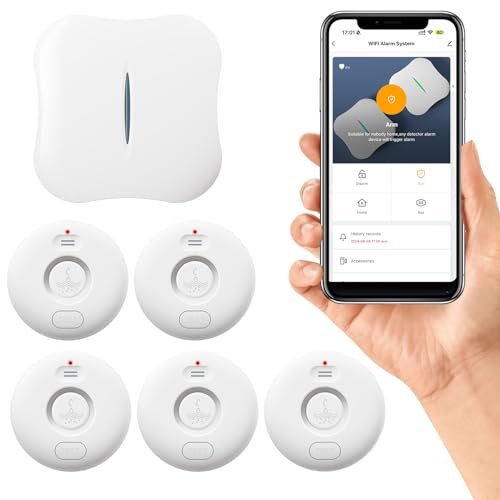
This Fansitc WiFi water leak detector 5-pack is built around that early-warning idea. The system uses battery-powered WD71 sensors, a WiFi-connected W13 gateway, local audible alarms, and Tuya Smart app notifications. The gateway can reportedly support up to 24 compatible sensors, making the starter pack expandable beyond the five detectors included here.
The most useful aspect of the system is that it does not rely on WiFi at each individual sensor. Instead, the sensors communicate with the gateway, while the gateway handles the internet connection and phone notifications. That can make placement more practical in basements, under cabinets, around water heaters, and other locations where WiFi reception may be inconsistent.
There are limitations to understand before buying. The gateway supports 2.4GHz WiFi only, sensor compatibility matters, wireless range depends on the building, and the system provides alerts rather than automatic water shutoff. Used within those limits, however, it can provide useful coverage across several common leak-prone areas of a home.
What Is the Fansitc WiFi Water Leak Detector System?
This is a multi-sensor smart water leak alarm system designed for residential monitoring.
The package contains several battery-powered water detectors that communicate wirelessly with a central gateway. The gateway connects to the home's 2.4GHz WiFi network and sends alerts through the Tuya Smart app.
The basic communication path is therefore:
Water sensor → W13 gateway → WiFi router → Tuya Smart app
That architecture is different from a standalone WiFi detector, where each sensor connects directly to the router.
A gateway-based design can make it easier to deploy numerous sensors without adding a separate WiFi device to the network for every monitored location.
Five Sensors for Multi-Room Coverage
A five-pack is useful because water risks are rarely confined to one location.
A single detector under the kitchen sink leaves the washing machine, water heater, bathrooms, sump pump, and refrigerator unmonitored.
With five sensors, homeowners can spread coverage across several of the most likely trouble spots.
Typical placements include:
- Under kitchen and bathroom sinks
- Beside a washing machine
- Near a water heater
- Next to a sump pump
- Behind a refrigerator or dishwasher
The exact placement should reflect the plumbing layout and history of the property.
Gateway Supports Up to 24 Compatible Sensors
The supplied information states that the W13 gateway can support up to 24 compatible WD71 leak sensors.
That makes the five-pack a starting point rather than a closed system.
A larger house could potentially expand coverage later without replacing the gateway.
This is useful for basements, utility rooms, rental properties, or homes with several bathrooms and appliances.
Compatibility needs close attention, though. The listing specifically notes that the W13 gateway is not compatible with the WD70 model.
Sensor Compatibility Is Easy to Overlook
Smart-home accessories from the same brand are not always interchangeable.
The listing identifies the WD71 as the compatible leak detector and warns against assuming that a WD70 sensor will work with the W13 gateway.
That matters if you plan to expand the system later or already own older sensors.
Check model numbers rather than relying only on brand appearance.
2.4GHz WiFi Only
The gateway supports 2.4GHz WiFi and does not connect directly to a 5GHz-only network.
This is common with smart-home devices because 2.4GHz generally offers better range through walls and consumes less power.
Most modern dual-band routers support both frequencies, but configuration can still cause setup problems.
If the home network combines 2.4GHz and 5GHz under the same network name, pairing may work normally, but some routers or mesh systems can require temporary adjustments during setup.
Why 2.4GHz Is Common in Leak Detectors
Leak-monitoring systems do not need the speed of a 5GHz connection.
They transmit small amounts of information such as device status, battery condition, and alarm events.
Range and wall penetration are more valuable than bandwidth.
For a gateway placed in a central part of the home, 2.4GHz is therefore a sensible choice.
Dual Water Detection for Drips and Standing Water
The WD71 sensors use two types of water detection according to the supplied description.
One is intended to detect dripping water, while contacts on the bottom detect water accumulating on the floor.
This can improve coverage because leaks do not all behave the same way.
A pipe may drip from above, while a failed appliance hose may rapidly spread water across the floor.
Bottom Leak Contacts
The bottom sensing points are designed to react when water reaches the floor beneath the detector.
That makes them useful around appliances and plumbing fixtures where water is likely to collect on a horizontal surface.
Placement matters.
The detector should sit at the lowest likely collection point rather than on a shelf or raised surface where water may never reach it.
Drip Detection
The additional drip-detection function can be useful where water may fall onto the sensor before substantial flooding occurs.
Examples include beneath sink plumbing, valves, or pipe joints.
Early detection of dripping can be valuable because a slow leak can cause damage long before enough water accumulates to trigger a conventional floor-only alarm.
IP65 Water Resistance
The sensors are described as IP65 rated.
That indicates protection against dust ingress and water jets under defined test conditions.
For a leak detector, that is useful because the device may be exposed directly to water during an alarm event.
IP65 should not be interpreted as permission to leave the unit permanently submerged.
It is still an electronic sensor and should be dried and inspected after significant water exposure.
Real-Time Phone Notifications
When a sensor detects water, it sends an event to the gateway.
The gateway then uses WiFi to push a notification through the Tuya Smart app.
This is the feature that makes the system more useful than a traditional standalone water alarm.
A local alarm is only effective if someone can hear it.
A phone notification can reach you while you are at work, traveling, or elsewhere on the property.
Remote Alerts Depend on Internet Connectivity
The remote-alert chain includes several dependencies.
The sensor must communicate with the gateway, the gateway must have power, the WiFi network must be functioning, the internet connection must be available, and the Tuya service must successfully deliver the notification.
If one of those pieces fails, remote alerts may not arrive.
The local sensor alarm can still provide protection for people who are nearby, but a smart leak detector should not be treated as infallible remote monitoring.
Wireless Range Between Sensor and Gateway
The source lists a maximum sensor-to-gateway range of approximately 328 feet in open space.
That is a best-case figure without walls, floors, metal appliances, or other obstructions.
The listing itself notes that normal household range is often closer to 150 feet or less depending on the environment.
That is a more useful way to think about placement.
A detector in a reinforced-concrete basement may have very different range from one in a wooden-frame hallway.
What Reduces Wireless Range?
Common obstacles include:
- Concrete walls and floors
- Metal appliances
- Electrical panels
- HVAC equipment
- Dense plumbing
- Long distances between floors
- Cabinets and utility enclosures
If a sensor does not communicate reliably, relocating the gateway to a more central position may help.
120dB Sensor Alarm
Each detector is described as having a loud local alarm reaching up to 120dB, with four adjustable volume levels.
That is intentionally attention-grabbing.
The benefit is that a leak can be heard even if the phone is unavailable.
A loud alarm is especially useful for basements, laundry rooms, or utility areas where a small beeper may go unnoticed.
Adjustable Alarm Volume
Four volume levels provide more flexibility than a fixed alarm.
A detector in a distant basement may justify a higher volume.
One located under a bathroom sink next to a bedroom may not need maximum output.
Being able to tune the alarm can reduce nuisance without disabling local warning entirely.
Gateway Alarm and Flashing Indicator
The gateway also reportedly produces a 90dB alarm and flashes red when a leak is detected.
That creates a second local warning point.
If a sensor is hidden under an appliance, family members may hear or see the gateway alarm even before locating the specific sensor.
The app can then help identify which detector triggered.
Device Naming Helps Identify the Leak Location
One advantage of smart multi-sensor systems is that each detector can typically be assigned a meaningful name in the app.
Names such as:
- Kitchen Sink
- Washing Machine
- Water Heater
- Basement Sump
- Upstairs Bathroom
are far more useful than generic labels such as "Sensor 1."
When an alarm arrives, the location should be immediately obvious.
Set these names during installation rather than waiting until the first emergency.
Sharing Access With Family Members
The system allows device sharing according to the supplied description.
That means more than one person can receive or review device information through the app.
This can be valuable when several adults share responsibility for a home.
If one person misses an alert, another may see it.
It is especially useful for rental properties, vacation homes, or households where one family member travels frequently.
Scheduled Arming and Disarming
The app includes scheduled arming and disarming.
This allows users to decide when the sensors actively trigger alarms or notifications.
For example, the source suggests disabling alarms at night to avoid disturbance.
That flexibility can be convenient, but it should be used cautiously.
Should You Disable a Water Leak Sensor at Night?
Usually, continuous monitoring is more protective.
Plumbing leaks do not follow schedules.
A washing-machine hose, toilet supply line, or water heater can fail during the night just as easily as during the day.
If alarm volume is the concern, reducing the sound while retaining monitoring may be preferable to fully disarming the detector, if the system permits it.
Disabling leak protection during long unattended periods would generally defeat the purpose of the system.
"Rainy Day" Disarming May Not Be Relevant Indoors
The source also mentions turning sensors off on rainy days.
For indoor leak detectors, rainfall alone should not normally trigger a properly placed sensor unless rainwater is entering the building.
If a sensor routinely alarms because rain reaches it, the placement itself may need reconsideration.
Scheduled disarming is useful, but it should not become a workaround for recurring false alarms.
Battery-Powered Sensors
Each sensor runs on two AAA batteries, and batteries are included according to the supplied listing.
Battery operation is ideal for leak detection because sensors can be placed in areas without outlets.
There are no power cords to route behind appliances or through cabinets.
The tradeoff is ongoing battery maintenance.
Battery Maintenance Is Critical
A leak detector with dead batteries provides no protection.
Check battery status periodically and replace batteries before they are completely exhausted.
If the app provides low-battery warnings, do not ignore them.
For detectors hidden under appliances or in basements, it can be helpful to include battery inspection in a regular household maintenance routine.
Best Places to Install Water Leak Sensors
The most effective placement is near equipment that can release a significant amount of water or where a slow leak could remain hidden.
Good locations include beneath supply lines, near drain connections, and at low points where water would naturally collect.
Under Sinks
Kitchen and bathroom cabinets contain several potential leak points: supply valves, flexible hoses, faucet connections, drains, garbage disposals, and filters.
Place the sensor on the cabinet floor rather than high against a pipe.
Near the Washing Machine
Washing machines combine pressurized supply hoses, drain plumbing, and substantial water volume.
A detector should sit near the lowest point beneath or beside the machine without interfering with leveling feet or vibration.
Near the Water Heater
Storage water heaters can leak from fittings, relief valves, drain valves, or the tank itself.
A sensor placed near the base may provide early warning.
For serious water-damage prevention, a drain pan and automatic shutoff system can add further protection.
Around a Sump Pump
A sump pump area is an obvious monitoring location because water is already present nearby.
Position the detector where overflow would reach it but normal sump operation would not cause repeated false alarms.
Under a Dishwasher
Dishwasher leaks can remain hidden behind cabinetry.
A slim detector near the front edge or another accessible low point may detect escaping water before it spreads farther.
Near a Refrigerator
Refrigerators with ice makers or water dispensers have pressurized supply tubing that can leak.
A detector behind or beside the appliance can provide useful coverage.
Leak Alarm vs. Automatic Shutoff System
This system detects water and alerts you, but the supplied description does not indicate that it automatically closes the home's water supply.
That is an important distinction.
A leak alarm tells you something is wrong.
An automatic shutoff system can physically stop water flow.
For vacation homes, expensive flooring, or properties with a history of plumbing failures, combining detection with an automatic main-water valve may provide stronger protection.
Smart Leak Sensor vs. Standalone Water Alarm
A basic water alarm may cost less and operate entirely without WiFi.
It can still be effective when someone is home.
The Fansitc system adds remote notifications, centralized management, expandable sensors, device naming, and shared access.
Those features are most valuable when you need to know about leaks while away from the property.
Smart Leak Sensor vs. Whole-House Flow Monitor
Whole-house water monitors look for unusual water usage in the main supply line.
Some can detect hidden leaks that never reach a floor sensor.
A floor detector does something different: it identifies actual water at a specific location.
The two approaches can complement each other.
A pipe-monitoring system provides broad coverage, while individual sensors protect high-risk locations.
False Alarms and Placement
A sensor placed too close to ordinary splashes may generate unnecessary alerts.
For example, directly beside a bathtub or beneath a frequently wet utility sink may not be ideal.
The goal is to position the sensor where unexpected water will reach it but normal household use will not.
A few inches of placement difference can make the system much more practical.
Test Every Sensor After Installation
Do not assume successful app pairing means water detection works correctly.
Test each sensor with a small amount of water in a controlled manner.
Verify that:
- The sensor alarms
- The gateway responds
- The correct sensor name appears
- The phone receives a notification
- Shared users receive expected access or alerts
Testing the complete chain is important before relying on the system.
Retest Periodically
Smart-home systems can change over time.
Batteries weaken, WiFi settings change, apps update, routers get replaced, and devices may be moved.
A periodic functional test confirms that the system still behaves as expected.
Testing every few months is far better than discovering a failed connection during a real leak.
Common Setup Mistakes
One common mistake is attempting to connect the gateway to a 5GHz-only network.
Another is buying incompatible WD70 sensors for a W13 gateway.
Users may also place the gateway too far from basement or upstairs sensors and assume the advertised 328-foot range applies indoors.
Another mistake is leaving sensor names generic, making it difficult to identify the alarm location.
Finally, scheduled disarming can create unprotected periods if used too aggressively.
What to Check Before Buying
Before purchasing this system, consider whether your home has a reliable 2.4GHz WiFi network and whether a central gateway location can reach all intended sensors.
Also decide whether five detectors are enough or whether you are likely to expand toward the gateway's stated 24-device capacity.
Check compatibility carefully if adding sensors separately.
For homes where stopping water automatically is essential, understand that an alert-only system may need to be paired with a separate shutoff solution.
Main Advantages
The strongest feature is broad, expandable monitoring.
Five battery-powered sensors provide useful initial coverage, while the gateway can reportedly support up to 24 compatible WD71 detectors.
Dual water detection, local alarms up to 120dB, gateway alerts, Tuya Smart notifications, device sharing, adjustable alarm volume, and IP65-rated sensor housings create multiple layers of warning.
The gateway architecture is also practical because only one device needs to connect directly to WiFi.
Potential Drawbacks
The system supports 2.4GHz WiFi only.
The listed long-range performance will be lower inside many homes.
Remote notifications depend on the gateway, router, internet connection, and Tuya platform.
The sensors also require battery maintenance.
Scheduled disarming can reduce protection if used poorly.
Most importantly, the system alerts users to a leak but does not appear to shut the water off automatically.
Who Should Consider This Leak Detector Kit?
This five-pack makes the most sense for homeowners who want affordable multi-location monitoring with remote alerts.
It may be especially useful for:
- Multi-bathroom homes
- Basements
- Laundry rooms
- Homes with sump pumps
- Properties with water heaters indoors
- Smart-home users
- Frequent travelers
- Vacation homes
- Landlords
- Buyers who want expandable leak coverage
For a single sink or appliance, a standalone detector may be sufficient. For broader whole-home monitoring, a multi-sensor gateway system provides more flexibility.
Frequently Asked Questions
How many sensors are included?
The product is described as a five-pack.
What sensor model does it use?
The listing identifies the compatible sensor as the WD71.
Does the W13 gateway work with WD70 sensors?
No. The supplied information specifically states that the W13 gateway is not compatible with WD70.
How many sensors can the gateway support?
Up to 24 compatible sensors, according to the source.
Does it support 5GHz WiFi?
No. The gateway supports 2.4GHz WiFi only.
Which app does it use?
Tuya Smart.
Can it send notifications when I'm away from home?
Yes, provided the gateway and internet connection are functioning.
What is the maximum sensor range?
The source lists up to 328 feet in open space.
What range should I expect indoors?
The manufacturer notes that home environments are commonly below approximately 150 feet, with actual range depending on walls and other obstacles.
Does each sensor have an audible alarm?
Yes.
How loud is the sensor?
The maximum listed alarm level is approximately 120dB.
Can the volume be adjusted?
Yes. Four volume levels are described.
Does the gateway also make noise?
Yes. The gateway is described as having a roughly 90dB alarm and flashing red indicator.
Can I mute an alarm?
Yes.
Can I share the system with family members?
Yes, according to the supplied description.
Can I schedule when sensors are armed?
Yes.
Are the sensors waterproof?
They are listed as IP65 water resistant.
What batteries do they use?
Two AAA batteries per sensor.
Are batteries included?
The source states that batteries are included with each water alarm.
Does the system automatically shut off my water?
Automatic valve shutoff is not mentioned in the supplied information, so this should be treated as an alert system rather than a water-control system.
Final Verdict
The Fansitc WiFi Water Leak Detector 5-Pack is a flexible smart-home leak monitoring system for users who want both loud local alarms and remote phone notifications across several areas of a property.
Its strongest features are the five WD71 sensors, dual drip-and-floor detection, 120dB adjustable alarms, IP65-rated housings, Tuya Smart integration, shared access, scheduled controls, and an expandable W13 gateway capable of supporting up to 24 compatible sensors.
The main limitations are dependence on 2.4GHz WiFi for the gateway, reduced wireless range inside real buildings, ongoing battery maintenance, and model-specific sensor compatibility. It also appears to provide detection and notification rather than automatic water shutoff.
For protecting sinks, washing machines, water heaters, sump pumps, refrigerators, and other high-risk locations, the system offers a useful balance of multi-room coverage, smartphone alerts, and straightforward expansion.