Grouven WiFi Sprinkler Timer Review: Smart Hose Watering With App Control, Flow Monitoring, and Cycle & Soak
Automating outdoor watering can save time, reduce missed irrigation, and make it easier to adapt a garden schedule when weather conditions change. For homeowners using hose-fed sprinklers, drip lines, or greenhouse irrigation, a smart faucet timer can provide much of that convenience without the cost or complexity of a permanent in-ground controller.
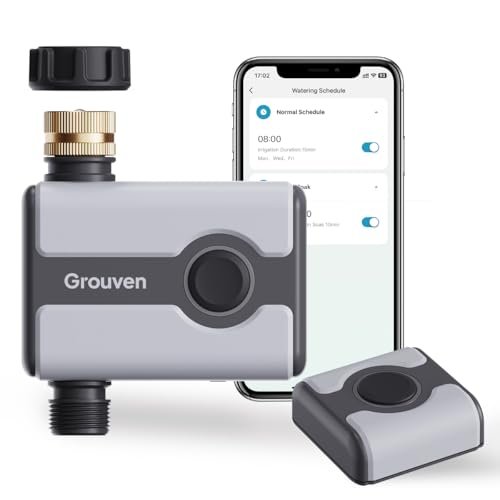
The Grouven WiFi sprinkler timer is designed for that role. It combines 2.4 GHz WiFi and Bluetooth connectivity with customizable watering schedules, Cycle & Soak programming, rain delay, manual watering, built-in flow monitoring, and voice control through Alexa and Google Assistant.
Its strongest appeal is flexibility. A single timer can automate one watering circuit, while multiple units can be connected through a gateway to manage several irrigation zones around a yard, patio, or greenhouse.
What Is the Grouven WiFi Sprinkler Timer?
The Grouven smart hose timer mounts directly to an outdoor faucet and controls when water is allowed to flow into a connected hose or irrigation system.
According to the supplied product information, it offers:
- 2.4 GHz WiFi connectivity
- Bluetooth control
- Smartphone app management
- Custom watering schedules
- Cycle & Soak programming
- Rain delay
- Manual watering
- Built-in flow meter
- Brass inlet
- Metal filter
- Up to 116 PSI stated pressure tolerance
- Alexa compatibility
- Google Assistant compatibility
- Multi-timer expansion through a gateway
This makes it substantially more capable than a conventional mechanical hose timer.
WiFi and Bluetooth Control
The timer supports both 2.4 GHz WiFi and Bluetooth.
That combination gives users more flexibility when interacting with the device.
WiFi is intended for remote access through the app, while Bluetooth can be useful for nearby setup or local communication.
Why Dual Connectivity Is Useful
A WiFi-only timer depends entirely on its network connection for app-based control.
Bluetooth adds another local communication method when the phone is nearby.
That can be useful during:
- Initial setup
- Troubleshooting
- Local adjustments
The exact behavior of WiFi and Bluetooth modes should be confirmed in the current product manual, because app functionality can vary by configuration.
Remote Watering From a Smartphone
Once properly connected, the timer can be managed through a smartphone app.
This allows users to control watering without physically walking to the outdoor faucet.
Remote control is especially useful when:
- Traveling
- At work
- Managing a large property
- Changing schedules after unexpected weather
It can also make seasonal adjustments much easier than reprogramming a small outdoor display.
Customizable Watering Programs
The Grouven timer supports programmable watering schedules.
The supplied description indicates that users can customize:
- Start time
- Watering frequency
- Duration
This gives enough flexibility for a wide range of outdoor watering tasks.
Different Plants Need Different Schedules
A smart timer is most useful when the schedule reflects actual plant needs.
For example:
- Lawn grass may need deeper, less frequent watering
- Vegetable beds may need more regular irrigation
- Containers may dry quickly
- Established shrubs may require less frequent watering
Avoid using the same schedule for every area simply because automation makes it convenient.
Cycle & Soak Watering
One of the more useful features is Cycle & Soak.
Instead of applying all the required water in one uninterrupted session, the timer can divide watering into shorter cycles with pauses in between.
This gives the soil more time to absorb water before the next cycle begins.
Why Cycle & Soak Matters
Some soils absorb water slowly.
If irrigation is applied too quickly, water may begin to:
- Pool
- Run across the surface
- Flow downhill
- Leave the root zone
Cycle & Soak can help reduce that problem by breaking one long watering period into smaller applications.
Best Conditions for Cycle & Soak
This mode can be particularly useful for:
- Sloped lawns
- Compacted soil
- Heavy clay
- Areas prone to runoff
It may be less important for fast-draining sandy soil or low-flow drip systems.
Rain Delay
The timer includes a rain-delay function.
According to the supplied description, watering can be paused for:
- 24 hours
- 48 hours
- 72 hours
- 96 hours
- 120 hours
- 144 hours
- 168 hours
This makes it easy to suspend irrigation temporarily without deleting or permanently changing the regular watering schedule.
Why Rain Delay Is Better Than Disabling the Schedule
If you completely turn off an irrigation timer after rain, it is easy to forget to turn it back on.
Rain delay is more convenient because it temporarily pauses watering and then allows the normal program to resume afterward.
That is useful after:
- Heavy rainfall
- Several wet days
- Unexpected storms
Rain Delay Still Requires Judgment
The timer does not directly know how much moisture is in the soil unless paired with additional sensing equipment.
A light shower may not justify a full seven-day delay, while heavy rainfall might.
Use the delay length according to actual local conditions.
Manual Watering Mode
The timer also supports manual watering without disrupting the recurring program.
The supplied description lists manual operation from approximately 1 minute up to 24 hours.
That broad range makes the timer suitable for both short tasks and longer irrigation sessions.
When Manual Watering Is Useful
Manual mode can be helpful when:
- New plants have just been installed
- A dry area needs extra water
- Fertilizer has been applied
- A greenhouse needs an unscheduled cycle
You can water temporarily without rewriting the automatic schedule.
Built-In Flow Meter
A particularly useful feature is the built-in flow meter.
According to the supplied description, it can record:
- Start time
- Stop time
- Flow rate
This gives users more insight into irrigation than a timer that simply opens and closes a valve.
Why Flow Monitoring Matters
Watering duration alone does not tell you how much water actually moved through the system.
Flow can change because of:
- Pressure variations
- Kinked hoses
- Clogged filters
- Partially blocked emitters
- Plumbing restrictions
Monitoring flow gives you another way to evaluate whether irrigation is working as expected.
Track Irrigation More Accurately
Flow information can help users compare watering sessions over time.
For example, if a zone normally operates at one flow rate and suddenly drops substantially, that may indicate a blockage or supply issue.
Likewise, unusually high flow could suggest a disconnected hose or leak downstream.
The exact alerting capabilities should be verified in the app.
Brass Inlet for Better Durability
The timer uses a brass inlet rather than an entirely plastic faucet connection.
That can be a practical advantage because the inlet is one of the most mechanically stressed parts of a hose timer.
It experiences repeated:
- Installation
- Removal
- Hose movement
- Outdoor exposure
A metal inlet may reduce wear around the threaded connection.
Leak Prevention Still Depends on Installation
A brass inlet can improve durability, but it does not automatically guarantee a leak-free installation.
Check that:
- Washer is correctly seated
- Threads are aligned
- Connection is secure
Avoid cross-threading or overtightening.
Built-In Metal Filter
The product also includes a metal filter.
This helps reduce the amount of debris entering the timer and downstream irrigation system.
That is especially useful with drip irrigation, where small emitters can clog easily.
Clean the Filter Periodically
Sediment can accumulate over time.
Inspect the filter if:
- Flow decreases
- Drip emitters weaken
- Sprinkler performance changes
Periodic cleaning can help maintain consistent operation.
Pressure Rating Up to 116 PSI
The supplied description states that the filter and timer can withstand water pressure up to approximately 116 PSI.
That is a relatively high stated maximum for residential hose-fed irrigation.
However, the connected irrigation components may have lower pressure limits.
For example, drip systems often require regulated pressure even if the timer itself can tolerate more.
Use a Pressure Regulator When Needed
Do not assume that the timer's maximum pressure is the correct operating pressure for the entire irrigation system.
If your:
- Drip tubing
- Emitters
- Micro-sprayers
require lower pressure, install an appropriate regulator.
Tool-Free Installation
The timer is designed for relatively simple installation.
In a typical setup, no specialized tools should be necessary.
The timer mounts between the faucet and watering line.
A basic configuration looks like:
Outdoor faucet → smart timer → hose or irrigation system
Test Before Automating
After installation, run the system manually before relying on a recurring schedule.
Check:
- Faucet connection
- Timer outlet
- Hose fittings
- Drip tubing
- Sprinklers
Confirm that every connection remains dry and that water reaches the intended area.
Voice Control With Alexa
The timer is advertised as compatible with Amazon Alexa.
Voice control can be useful for simple commands such as starting or stopping watering.
This is convenient when you are already working around the house and do not want to open the app.
Google Assistant Compatibility
Google Assistant support is also listed.
As with Alexa, voice control is best treated as a convenience feature rather than the primary way to manage irrigation.
Complex schedules are generally easier to review and configure in an app.
Multi-Zone Expansion
The Grouven system can be expanded by connecting multiple timers to one gateway.
That is useful for users who want to automate several outdoor faucets or irrigation circuits.
For example:
- Front lawn
- Backyard
- Vegetable garden
- Greenhouse
could each have a separate timer.
Why Multiple Timers Can Be Better Than One Hose Splitter
A basic splitter can create several hose outlets, but it does not automatically give each outlet an independent smart schedule.
Separate smart timers allow each zone to operate according to its own watering requirements.
That is much more useful in a mixed landscape.
Good Applications
The Grouven timer can fit several types of outdoor watering.
Lawn Sprinklers
Use it with a hose-fed sprinkler and schedule regular lawn watering.
Drip Irrigation
A strong application for:
- Raised beds
- Shrubs
- Flowers
- Vegetables
Greenhouses
Automated watering can help maintain a more consistent routine for greenhouse plants.
Patio Containers
A drip line can distribute water among multiple pots and planters.
Smart Timer vs. Mechanical Timer
A mechanical timer remains the simplest option.
Mechanical Timer Advantages
- No WiFi
- No app
- No gateway
- Simple operation
Grouven Smart Timer Advantages
- Remote control
- Cycle & Soak
- Rain delay
- Flow monitoring
- Voice control
- Multi-zone expansion
The smart timer makes more sense when those additional features will actually be used.
WiFi Timer vs. In-Ground Sprinkler Controller
The Grouven timer is intended for hose-fed irrigation.
A permanent sprinkler controller is designed for electrically operated irrigation valves.
Choose the Grouven format for:
- Garden hoses
- Drip systems
- Above-ground sprinklers
- Greenhouse watering
Choose a conventional irrigation controller for a permanent multi-zone underground sprinkler system.
Common Mistakes to Avoid
Using Only 5 GHz WiFi
The supplied description specifies 2.4 GHz WiFi.
Ignoring Pressure Requirements
The timer may tolerate higher pressure than the downstream irrigation system.
Creating Schedules Without Testing Flow
Run each watering circuit manually first.
Using Rain Delay Without Checking Soil
Rainfall totals and actual soil moisture are not always the same.
Forgetting Filter Maintenance
A clogged filter can reduce irrigation performance.
How to Build a Better Watering Schedule
Start by observing how quickly the soil absorbs water.
If runoff begins before the root zone is adequately wet, use Cycle & Soak rather than one long continuous session.
Then adjust watering frequency according to:
- Plant type
- Soil
- Season
- Weather
- Sun exposure
Review the schedule periodically rather than leaving it unchanged all year.
Water Efficiency Tips
Smart control can reduce unnecessary watering, but only if the irrigation system itself is configured well.
Check periodically for:
- Leaking fittings
- Broken emitters
- Overspray
- Runoff
A smart timer cannot compensate for a poorly maintained hose or irrigation line.
Advantages and Considerations
Advantages
- 2.4 GHz WiFi connectivity
- Bluetooth support
- Smartphone app control
- Customizable schedules
- Cycle & Soak mode
- Rain delay from 24 to 168 hours
- Manual watering from 1 minute to 24 hours
- Built-in flow meter
- Brass inlet
- Metal filter
- Up to 116 PSI stated pressure tolerance
- Alexa compatibility
- Google Assistant compatibility
- Multi-timer expansion
Potential Considerations
2.4 GHz WiFi is required for connected operation.
Some installations may require a gateway.
Drip irrigation may need separate pressure regulation.
Flow monitoring does not replace regular physical inspection.
Voice-assistant capabilities can depend on current app and platform support.
Frequently Asked Questions
Does the Grouven timer support WiFi?
Yes. The supplied description specifies 2.4 GHz WiFi.
Does it also support Bluetooth?
Yes.
Can I control watering remotely?
Yes, through the connected smartphone app.
Does it support automatic schedules?
Yes.
What is Cycle & Soak?
It divides watering into shorter cycles with pauses between them, helping slower soil absorb water more effectively.
Does it have rain delay?
Yes. The source lists delays from 24 hours up to 168 hours.
Can I water manually?
Yes, from approximately 1 minute to 24 hours according to the supplied description.
Does it measure water flow?
Yes. A built-in flow meter is listed.
Is the inlet plastic?
No. The supplied description specifies a brass inlet.
Does it include a filter?
Yes, a built-in metal filter is described.
What is the stated maximum water pressure?
Up to approximately 116 PSI according to the source.
Does it work with Alexa?
Yes, according to the supplied product information.
Does it work with Google Assistant?
Yes.
Can I manage multiple watering zones?
Multiple timers can reportedly be connected to one gateway to create separate irrigation zones.
Final Thoughts
The Grouven WiFi sprinkler timer offers a broad feature set for homeowners who want more control than a traditional hose timer can provide.
Its strongest features are the combination of WiFi and Bluetooth connectivity, customizable schedules, Cycle & Soak watering, long-duration rain delay, manual control, built-in flow monitoring, and a more durable brass inlet. The ability to add several timers through one gateway also makes the system more useful for yards with multiple independent watering areas.
The main considerations are typical of smart hose timers: reliable 2.4 GHz connectivity is important, downstream irrigation components may still require pressure regulation, and automated schedules should be reviewed as seasons and plant requirements change.
For users looking for a smart WiFi hose timer with Bluetooth, Cycle & Soak, flow monitoring, rain delay, Alexa and Google Assistant control, and expandable multi-zone irrigation, the Grouven system provides a flexible approach to automating lawns, gardens, greenhouses, and drip irrigation.