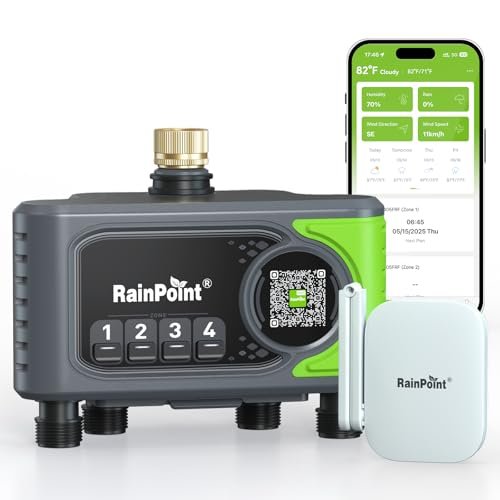
RAINPOINT 4-Zone WiFi Water Timer Review: Smart Irrigation Control for Gardens, Lawns, and Balconies
A smart irrigation timer can take much of the routine work out of watering a garden, lawn, patio, or balcony. Instead of manually turning outdoor faucets on and off, a connected timer can run different schedules, react to weather conditions, and let you make changes remotely from a phone.
The RAINPOINT 4-zone WiFi water timer is built for that kind of automated watering. It supports four independently managed zones, multiple scheduling patterns, three watering modes, app and voice control, weather-based automation, and manual operation if the wireless connection is unavailable.
Its strongest appeal is flexibility. A single controller can manage plants with very different watering requirements, from balcony herbs and flower beds to larger lawn zones. However, it is important to understand that the four outlets operate sequentially rather than simultaneously, which affects how schedules should be configured.
What Is the RAINPOINT 4-Zone WiFi Water Timer?
This is a connected outdoor irrigation timer designed to control up to four watering zones from one system.
According to the supplied product information, it offers:
- Four watering zones
- WiFi-connected app control
- Five watering-frequency options
- Three watering modes
- Manual watering
- Weather-based automation
- Voice control
- Low-battery notifications
- Long-range gateway communication
- Future watering-plan overview
The timer is aimed at homeowners who want more control than a basic mechanical hose timer can provide.
Why Four Zones Matter
A single-zone timer works well if every plant receives water from the same hose or irrigation circuit.
A four-zone system is more useful when different parts of the property have different requirements.
For example, one controller could manage:
- Zone 1: lawn
- Zone 2: flower bed
- Zone 3: vegetable garden
- Zone 4: patio containers
Each area can then have its own duration and schedule.
This is particularly useful because a lawn and a container herb garden often should not be watered in exactly the same way.
Five Watering Frequency Options
The timer supports several ways to determine when watering occurs.
The supplied description lists:
- Daily
- Weekly
- Odd dates
- Even dates
- Custom scheduling
That provides more flexibility than a simple timer that only waters every fixed number of hours or days.
Daily Watering
Daily schedules may be useful for applications such as:
- Seedlings
- Small containers
- Newly established plants
However, daily watering is not automatically the best option for every garden.
Soil type, climate, root depth, and plant species should determine the actual frequency.
Weekly Scheduling
Weekly scheduling makes it possible to select specific days.
For example, a lawn zone might run on selected mornings each week while a vegetable garden uses a different pattern.
This is often easier to manage than changing durations manually throughout the week.
Odd and Even Date Watering
Odd/even scheduling can be useful in locations where watering restrictions are based on calendar dates.
It can also simplify alternating watering patterns.
Always verify local irrigation restrictions before relying on an automated schedule.
Custom Scheduling
Custom scheduling gives the most flexibility when a standard daily or weekly pattern does not fit.
This can be useful for gardens with:
- Different plant maturity
- Seasonal requirements
- Variable sun exposure
- Different soil drainage rates
Smart irrigation becomes most useful when the schedule reflects the actual landscape rather than simply running the same routine everywhere.
Three Watering Modes
The timer supports three watering approaches:
- Normal
- Interval
- Cycle & Soak
These modes address different irrigation situations.
Normal Watering Mode
Normal mode is the simplest.
The valve opens, runs for the selected period, and then closes.
This works well for:
- Drip irrigation
- Containers
- Small garden beds
where continuous watering for the selected duration is appropriate.
Interval Watering
Interval watering breaks irrigation into repeated periods rather than one uninterrupted session.
This can be useful where the watering system or plants benefit from shorter recurring applications.
The exact behavior should be confirmed in the RAINPOINT app because interval definitions may vary by product configuration.
Cycle & Soak Mode
Cycle & Soak can be particularly useful for lawns and compacted or sloped soil.
Instead of applying all the water continuously, the timer runs a shorter cycle, pauses, and then resumes.
This gives the soil additional time to absorb water.
It may help reduce:
- Surface runoff
- Pooling
- Water flowing away from the intended area
This is especially useful when sprinkler output is faster than the soil's infiltration rate.
Sequential Zone Operation
One of the most important details in the supplied description is that zones execute their watering plans in sequence.
That means all four zones are not necessarily running at the same time.
This should be considered when building the schedule.
Why Sequential Watering Can Be Helpful
Running one zone at a time can reduce demand on the water supply.
If multiple irrigation circuits were opened simultaneously, available pressure could drop.
Sequential operation can therefore help maintain more consistent pressure for:
- Sprinklers
- Drip systems
- Hose-connected irrigation
Avoid Overlapping Schedules
The manufacturer warns against setting repeated or overlapping watering times.
Because zones run sequentially, poorly planned schedules could cause conflicts or make the overall watering period longer than expected.
A better approach is to create one logical sequence across the four zones.
For example:
Zone 1 could begin first, followed by zones 2, 3, and 4.
WiFi Gateway Connectivity
The system uses a dedicated gateway, identified in the supplied description as the HWG023BRF.
The gateway links the watering timer with the broader network and app.
RAINPOINT claims improved coverage compared with traditional hubs.
Up to 492 Feet of Transmission Range
The supplied description states a maximum communication distance of approximately 492 feet.
That can be useful when:
- Outdoor faucet is far from router
- Garden extends behind the house
- Timer is positioned near a detached area
However, any stated maximum range should be treated as an ideal-condition figure.
Walls, structures, terrain, interference, and placement can reduce real-world performance.
Placement Still Matters
The source recommends placing the gateway higher for better signal.
That is sensible because wireless communication generally performs better when fewer physical obstacles block the path.
Avoid placing the gateway:
- Behind large metal objects
- Inside heavily enclosed cabinets
- Near sources of strong interference
when possible.
Weather-Based Smart Automation
One of the more useful smart features is the ability to create automation based on environmental conditions.
The supplied description mentions:
- Weather
- Humidity
- Temperature
These conditions can be incorporated into watering decisions.
Rain-Based Watering Skip
A smart timer can potentially skip or modify irrigation when rain is expected or detected through its configured weather logic.
This can prevent unnecessary watering during wet conditions.
That is more useful than a fixed timer that runs regardless of weather.
Temperature-Based Adjustment
Temperature can also influence plant water requirements.
During hot weather, containers and shallow-rooted plants may dry more quickly.
During cooler periods, they may need less frequent irrigation.
The timer's automation tools can help adapt schedules, but users should avoid assuming that temperature alone determines the correct amount of water.
Humidity-Based Scenarios
Humidity can be another useful environmental signal.
Low humidity can increase moisture loss from leaves and soil, while humid conditions may reduce evaporation.
Used carefully, these conditions can make automation more responsive than a rigid calendar schedule.
Smart Weather Automation Has Limits
Weather-based control depends on the quality and relevance of the data used by the app.
A forecast may not always reflect conditions in your exact garden.
For example:
- One neighborhood receives rain while another does not
- A covered patio remains dry
- Container soil dries faster than nearby lawn
Smart automation should therefore support observation rather than replace it completely.
App-Based Remote Control
The system can be controlled from a phone through the associated app.
That allows users to adjust irrigation without physically visiting the faucet.
Remote control is useful when:
- Traveling
- Checking garden conditions remotely
- Changing a schedule after unexpected rain
- Starting or stopping a watering cycle
Manual App Override
The supplied description also mentions app-based override.
This lets users temporarily take control rather than waiting for the programmed schedule.
For example, you may want to run one zone after:
- Planting
- Fertilizing
- A particularly hot afternoon
without permanently changing the normal schedule.
Voice Control
The timer also supports voice-based control according to the supplied description.
This can be convenient for simple commands when working around the house.
However, irrigation schedules are generally better managed through the app because they involve durations, zones, and recurring logic that are easier to review visually.
Manual Watering Without WiFi
An important fallback feature is manual watering directly from the timer.
If wireless connectivity is lost, the system does not become completely unusable.
The supplied description states that long-pressing the timer button can trigger approximately 10 minutes of manual watering.
That can be useful when:
- Router is offline
- Gateway loses connection
- Internet service is unavailable
Why Local Manual Control Matters
Smart-home devices should ideally retain basic functionality even when connectivity fails.
A garden should not become impossible to water simply because the app cannot connect.
The physical override gives the timer a practical fallback.
Low-Battery Notifications
The system can send notifications when battery power is running low.
That is important because outdoor timers are easy to forget once schedules are working automatically.
A low-battery alert gives users time to replace batteries before irrigation stops unexpectedly.
Check Battery Status Before Travel
If you rely on automated irrigation while away from home, verify the battery level before leaving.
Remote notifications are helpful, but they are not a substitute for basic preparation.
This is especially important during hot weather when missing several watering cycles could affect container plants quickly.
Future Watering Plan Overview
The source mentions an overview of future schedules.
This is a useful feature because complex multi-zone systems can become difficult to understand if each zone has its own schedule.
A future-plan view can help users confirm:
- Which zone runs next
- When watering begins
- How long the entire sequence will take
This can also help reveal accidental schedule conflicts.
Best Uses for a Four-Zone Timer
The system can be useful for several types of irrigation.
Lawn Sprinklers
Different lawn sections can be separated into zones.
Vegetable Gardens
Drip lines can run on a different schedule from lawn sprinklers.
Flower Beds
Beds with different sun exposure can receive different durations.
Balcony and Patio Plants
Container irrigation can be managed independently from the rest of the yard.
Drip Irrigation Compatibility
A smart hose timer can work particularly well with drip systems because drip irrigation already divides water precisely among plants.
The timer then determines:
- When water starts
- How long it runs
- Which zone receives water
The combination can provide more precise watering than simply attaching a sprinkler to a hose.
Water Pressure Considerations
Because the zones operate sequentially, the system can help avoid excessive pressure demand.
However, users should still verify that:
- Faucet provides sufficient pressure
- Connectors are properly sealed
- Irrigation system does not exceed the timer's supported pressure range
The supplied description does not provide pressure specifications, so these should be confirmed from the manufacturer's documentation before installation.
Installation Planning
Before installing the timer, identify which area will belong to each zone.
A good zone should group plants with similar water needs.
Avoid placing plants with radically different requirements on the same circuit whenever possible.
For example, drought-tolerant plants and thirsty vegetable crops generally should not share identical irrigation timing.
Label the Zones
Even though the app may allow naming, physically labeling hoses can also help.
Useful names might include:
- Front Lawn
- Raised Beds
- Patio
- Side Garden
This makes troubleshooting much easier later.
Check for Leaks After Installation
After connecting the timer:
- Open the faucet.
- Run each zone manually.
- Inspect all threaded connections.
- Verify that valves close completely.
- Confirm water reaches the intended irrigation area.
Small connection leaks can waste water continuously if the faucet remains pressurized.
Protect Outdoor Connections
Hose connections should be tightened securely but not excessively.
Thread damage can cause leakage.
If required by the fitting design, use suitable washers and follow the manufacturer's installation guidance rather than relying on excessive force.
Seasonal Maintenance
Outdoor irrigation hardware should be considered seasonal equipment in climates where freezing occurs.
Water left inside a timer or valve can expand when frozen and damage internal components.
Follow the manufacturer's instructions for:
- Winter removal
- Drainage
- Storage
before freezing conditions arrive.
Smart Timer vs. Basic Hose Timer
A basic hose timer can be sufficient for simple watering.
Basic Timer Advantages
- Lower complexity
- No app
- Straightforward operation
RAINPOINT Smart Timer Advantages
- Four zones
- Remote control
- Weather automation
- Multiple scheduling modes
- Voice control
- Battery notifications
The smart timer makes more sense when irrigation requirements are complex enough to justify the added configuration.
Four-Zone Timer vs. Four Separate Timers
Using one integrated four-zone device can simplify management.
Rather than configuring multiple independent timers, you can control the irrigation system through one interface.
This can reduce:
- Schedule confusion
- App clutter
- Hardware duplication
The main tradeoff is that a failure of the central unit could affect several zones at once.
Common Mistakes
Using the Same Schedule for Every Zone
Different plants often require different watering patterns.
Creating Overlapping Schedules
Remember that zones execute sequentially.
Relying Entirely on Weather Automation
Local soil conditions still matter.
Ignoring Gateway Placement
Wireless performance can depend heavily on location.
Forgetting Winterization
Outdoor water devices can be damaged by freezing.
How to Build a Better Watering Schedule
Start conservatively.
Run each zone long enough to determine how quickly water reaches the root zone without creating runoff.
Then adjust based on:
- Soil moisture
- Plant response
- Weather
- Season
The goal is not to maximize the number of automated cycles. It is to provide enough water with as little waste as practical.
Advantages and Considerations
Advantages
- Four independently managed zones
- Five scheduling-frequency options
- Normal, Interval, and Cycle & Soak modes
- WiFi-connected app control
- Weather-based automation
- Manual fallback
- Voice control
- Low-battery notifications
- Long-range gateway claim
- Future schedule overview
Potential Considerations
Zones run sequentially.
Overlapping schedules should be avoided.
Actual wireless range depends on installation conditions.
Weather data may not perfectly represent the garden.
Battery maintenance is still required.
Frequently Asked Questions
How many watering zones does it support?
Four.
Can each zone have a different schedule?
The system is designed to provide customizable watering plans for multiple zones.
What watering frequencies are available?
The supplied information lists daily, weekly, odd-date, even-date, and custom scheduling.
What watering modes are available?
Normal, Interval, and Cycle & Soak.
Can all four zones run at the same time?
The supplied description states that zones execute their watering plans sequentially.
Does it use WiFi?
Yes, through the supplied gateway architecture.
What is the stated transmission range?
The source claims up to approximately 492 feet under suitable conditions.
Can it skip watering when rain is expected?
Weather-based smart scenarios can be configured according to the supplied description.
Can it be used if WiFi goes down?
Yes. A physical control can provide manual watering for approximately 10 minutes according to the source.
Can I control it from my phone?
Yes.
Does it support voice control?
Yes, according to the supplied product description.
Does it warn about low batteries?
Yes. Low-battery notifications can be sent.
Final Thoughts
The RAINPOINT 4-zone WiFi water timer is designed for users who need more control than a conventional single-zone hose timer can provide.
Its biggest advantages are the combination of four independently managed watering circuits, multiple scheduling patterns, Cycle & Soak capability, remote app control, and weather-based automation. The long-range gateway architecture may also make it practical for gardens where the outdoor faucet is some distance from the home's main router.
The most important operational detail is that watering zones run sequentially, so schedules should be planned as one coordinated irrigation sequence rather than four independent programs that overlap.
For homeowners looking for a 4-zone smart WiFi water timer with weather automation, Cycle & Soak scheduling, manual offline watering, app control, and long-range wireless connectivity, this RAINPOINT system offers a flexible platform for automating lawns, gardens, patios, and other outdoor watering zones.