Lumary Smart Sprinkler Timer Review: WiFi Garden Irrigation With App Control, Rain Delay, and Flexible Scheduling
Automating outdoor watering can make garden care more consistent while reducing the need to manually open and close a faucet every day. For homeowners using drip irrigation, hose-fed sprinklers, raised beds, or small lawn zones, a smart hose timer can provide much of the convenience of a connected irrigation system without installing permanent underground controls.
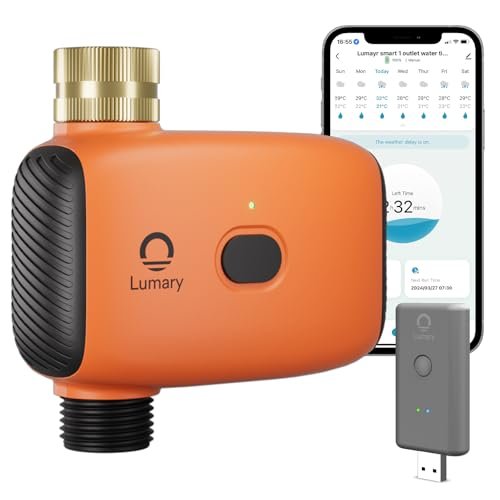
The Lumary Smart Sprinkler Timer is designed for that type of setup. It combines 2.4 GHz WiFi connectivity through an included gateway with remote app control, regular and cyclical watering schedules, manual watering, irrigation history, voice control, and temporary rain delays.
Its main strength is flexibility. Once the timer is paired with the Lumary app and gateway, users can manage watering remotely, review irrigation activity, and create schedules suited to different plants and watering methods. At the same time, it remains a faucet-mounted irrigation controller rather than a full in-ground sprinkler system, which makes it more appropriate for hose-based watering applications.
What Is the Lumary Smart Sprinkler Timer?
The Lumary timer is a battery-powered smart irrigation valve that attaches to an outdoor faucet and controls water flowing into a hose, sprinkler, or drip system.
According to the supplied product information, the system includes:
- 2.4 GHz WiFi connectivity through a gateway
- Lumary app control
- Remote watering management
- Regular irrigation schedules
- Cyclical irrigation schedules
- Manual watering
- Voice-control support
- Irrigation-history records
- 24-, 48-, and 72-hour rain delays
- Brass faucet inlet
- IP55-rated outdoor protection
- Included gateway
- Waterproof adjustable adapter
- US-thread adapter
- Waterproof tape
- User manual
Battery requirements depend on the version. The supplied information states that the one-zone model requires two AA batteries, while the two-zone model requires four AA batteries.
How the WiFi System Works
The timer does not connect to the home network entirely on its own. Instead, it communicates through the included gateway.
The gateway connects to a 2.4 GHz WiFi network, while the outdoor timer is paired with the gateway through the Lumary app.
This architecture allows users to control watering remotely while keeping the battery-powered timer outside near the faucet.
Keep the Gateway Powered
The source specifically notes that remote operation depends on the gateway remaining powered and the home router staying online.
If you plan to use the system while traveling, do not disconnect:
- The WiFi router
- The gateway's USB power
Remote access naturally depends on those components remaining operational.
2.4 GHz WiFi Is Required
The gateway requires a 2.4 GHz network.
This is common for smart-home devices because 2.4 GHz generally offers better range through walls than 5 GHz.
During installation, confirm that:
- 2.4 GHz WiFi is enabled
- The gateway has a reliable connection
- The outdoor timer remains within effective communication range
Weak WiFi or poor gateway placement may reduce remote-control reliability.
Pair the Timer Through the Gateway
The supplied instructions emphasize that the sprinkler timer must be added to the gateway from inside the Lumary app.
Simply connecting the gateway to WiFi is not enough.
The timer and gateway must also be paired correctly before features such as remote control and smart scenes can operate as intended.
Remote App Control
Once connected, the Lumary app becomes the main interface for managing irrigation.
Remote access allows users to check or change watering even when they are away from home.
This can be useful if:
- You are traveling
- Weather changes unexpectedly
- Plants need additional water
- A scheduled cycle needs to be paused
That flexibility is one of the biggest advantages over a traditional mechanical hose timer.
Regular Watering Mode
The timer supports a conventional scheduled-watering mode.
This allows users to configure regular irrigation according to plant and landscape needs.
A typical schedule might define:
- Watering start time
- Duration
- Frequency
This works well for applications where one continuous irrigation session is appropriate.
Good Uses for Regular Scheduling
Standard schedules are practical for:
- Lawn sprinklers
- Flower beds
- Raised gardens
- Soaker hoses
- Basic drip irrigation
Once configured properly, the system can maintain a consistent routine without daily manual intervention.
Cyclical Irrigation Mode
The Lumary timer also supports cyclical watering.
Instead of simply running once for a fixed period, cyclical scheduling can alternate watering and pause periods or repeat irrigation according to a defined pattern.
This can be useful when water needs to be applied gradually.
Why Cyclical Watering Can Help
Some soils absorb water slowly.
If irrigation is applied faster than the soil can accept it, excess water may:
- Pool
- Run downhill
- Flow onto pavement
- Leave the intended root zone
Dividing irrigation into shorter cycles can give the soil additional time to absorb moisture.
Where Cyclical Irrigation Makes Sense
It can be particularly useful for:
- Clay soil
- Compacted lawns
- Sloped areas
- Newly planted beds
It may be less necessary for low-flow drip systems or highly permeable soil.
Customize Schedules to Plant Needs
The strongest use of a smart timer is not simply automating the same routine every day.
Different plants have different requirements.
For example:
- Containers may dry quickly
- Vegetable beds may need regular watering
- Established shrubs may need less frequent irrigation
- Lawn grass may benefit from deeper watering
Build the schedule around the landscape rather than forcing every plant into the same watering pattern.
Irrigation History
The supplied description states that users can review irrigation records.
This is a useful feature because it provides visibility into what the timer has actually been doing.
Watering history can help answer questions such as:
- Did the scheduled cycle run?
- How frequently has the garden been watered?
- Was irrigation skipped recently?
- Has the schedule changed over time?
Use Irrigation Records to Improve the Schedule
History is most useful when compared with actual plant and soil conditions.
If plants remain healthy while watering frequency decreases, you may be able to reduce irrigation further.
If the soil repeatedly dries out before the next cycle, schedule adjustments may be necessary.
Manual Watering
The timer includes manual watering for on-demand use.
This lets you water immediately without permanently modifying the automated schedule.
Manual control can be useful after:
- Planting
- Fertilizing
- Transplanting
- An unusually hot day
Once the temporary watering session is complete, the normal program can continue.
Why Manual Override Matters
Even a well-designed automatic schedule cannot anticipate every situation.
A physical or app-based manual option gives users control when the landscape needs something outside the normal routine.
Voice Control
The supplied description mentions hands-free voice control.
This can provide another convenient way to start or stop watering when connected through compatible smart-home services.
Voice control is best suited to simple actions.
Detailed schedule configuration is usually easier in the Lumary app, where start times, durations, and recurring programs can be reviewed clearly.
Rain Delay
The timer includes a rain-delay function that can pause scheduled watering for:
- 24 hours
- 48 hours
- 72 hours
This is useful after rainfall when continuing the normal schedule would provide little benefit.
After the selected delay ends, irrigation can return to the programmed routine.
Rain Delay Must Be Enabled
The supplied instructions specifically note that the rain-delay feature must be turned on in the app when you want to use it.
It should not be assumed that every rain event will automatically cancel irrigation unless the relevant feature is configured.
Weather Data and Rain Delay
The source also refers to local weather information being used to help prevent overwatering.
Weather-aware irrigation can be useful, but it should not be treated as a direct measurement of soil moisture.
A forecast cannot account perfectly for differences such as:
- Covered garden beds
- Container plants
- Shade
- Soil drainage
Check actual landscape conditions periodically.
Water-Saving Potential
A smart timer can support more efficient water use by combining:
- Scheduled watering
- Rain delays
- Manual control
- Irrigation monitoring
These tools can help prevent unnecessary watering, but the timer itself does not guarantee water savings.
The biggest gains usually come from creating an appropriate schedule and maintaining the irrigation system properly.
Avoid Overwatering
Watch for signs that irrigation is excessive, such as:
- Runoff
- Persistent puddles
- Constantly saturated soil
If water remains on the surface rather than soaking in, reduce run time or consider using cyclical watering.
Brass Inlet Construction
The timer uses a brass inlet according to the supplied description.
This is a useful durability feature because the faucet connection experiences repeated mechanical stress.
It may be exposed to:
- Hose weight
- Outdoor heat
- Sunlight
- Repeated installation
Brass is generally more durable than lightweight plastic threads in these conditions.
Why Brass Matters
Plastic fittings can become damaged through:
- Cross-threading
- Overtightening
- Repeated use
A brass connection can provide a more robust interface between the faucet and timer.
Still, always align threads carefully and avoid excessive force.
Outdoor Durability
The timer is described as IP55 rated.
That indicates a level of protection against dust and water exposure suitable for outdoor use within the limits of the rating.
It does not mean the timer can be submerged.
The supplied warning specifically states that the device can tolerate spraying but should not be immersed in water.
Protect It From Standing Water
Install the timer where water cannot collect around it.
Avoid:
- Low spots that flood
- Buckets or enclosures that trap water
- Locations where the timer could become submerged
Outdoor-rated electronics still benefit from sensible placement.
Sun and Heat Resistance
The brass inlet is also described as resistant to high temperatures and sunlight exposure.
This can be useful because faucet-mounted irrigation devices often remain outside for long periods.
Even so, reducing unnecessary exposure to extreme conditions may help extend product life.
Battery Requirements
The supplied information distinguishes between the one-zone and two-zone versions.
One-Zone Model
Requires two AA batteries.
Two-Zone Model
Requires four AA batteries.
The source does not state that batteries are included, so they should be treated as a separate requirement unless the package specifically says otherwise.
Battery Maintenance
Before leaving the timer responsible for watering during travel, check battery condition.
A smart irrigation system still depends on enough battery power to operate its valve.
If possible, replace weak batteries before extended absences.
One-Zone vs. Two-Zone Version
A one-zone model controls one irrigation circuit.
A two-zone model can control two separate watering areas from the same faucet, depending on the specific version.
The two-zone design may be useful for separating:
- Lawn and garden
- Drip line and sprinkler
- Front bed and side bed
Choose the version according to how many independent watering circuits you actually need.
Good Applications
Drip Irrigation
One of the strongest uses for a smart hose timer.
It can automate drip lines serving:
- Vegetables
- Shrubs
- Raised beds
- Flowers
Lawn Sprinklers
The timer can run a hose-fed sprinkler according to a programmed schedule.
Greenhouses
Cyclical irrigation can be useful where plants require more frequent controlled watering.
Soaker Hoses
Regular schedules work well with soaker hoses in landscape beds.
Smart Hose Timer vs. Mechanical Timer
A basic mechanical timer remains easier to operate.
Mechanical Timer Advantages
- No app
- No WiFi
- No gateway
Lumary Smart Timer Advantages
- Remote control
- Voice operation
- Irrigation history
- Cyclical scheduling
- Rain delay
The smarter option is most worthwhile when those features will actually be used.
Smart Hose Timer vs. In-Ground Controller
The Lumary system is intended for faucet-fed irrigation.
It is not a replacement for a conventional multi-station controller used with permanently installed 24 VAC irrigation valves.
Use the Lumary format for:
- Garden hoses
- Above-ground sprinklers
- Drip systems
- Soaker hoses
Use a traditional irrigation controller for a permanent underground sprinkler system.
Installation Overview
A typical setup involves:
- Installing the required AA batteries.
- Attaching the timer to the outdoor faucet.
- Connecting the hose or irrigation system.
- Powering the included gateway.
- Connecting the gateway to 2.4 GHz WiFi.
- Adding the timer to the gateway in the Lumary app.
- Creating watering schedules.
Follow the supplied manual for exact setup and pairing instructions.
Check for Leaks Before Automating
After installation, open the faucet and inspect:
- Brass inlet
- Outlet connection
- Adapter
- Hose fittings
Do not rely on unattended irrigation until all connections remain dry under pressure.
Included Accessories
The supplied package reportedly includes:
- Lumary sprinkler timer
- Gateway
- Waterproof adjustable adapter
- US-thread adapter
- Waterproof tape
- Manual
Actual package contents may vary by version, so confirm the exact listing before purchase.
Cold-Weather Limitation
One of the most important limitations in the supplied description is that the timer should not be used when freezing conditions occur.
Water remaining inside a hose timer can freeze and expand, potentially damaging the valve or housing.
Winterize the Timer
Before freezing temperatures arrive:
- Disconnect it from the faucet
- Drain remaining water
- Dry the timer
- Store it according to manufacturer instructions
Do not assume weather resistance means freeze resistance.
Common Mistakes to Avoid
Using 5 GHz WiFi Only
The system requires 2.4 GHz WiFi.
Forgetting to Pair the Timer With the Gateway
The timer must be added through the Lumary app.
Turning Off the Gateway While Traveling
Remote control depends on the gateway staying powered.
Leaving the Timer Outside During Freezing Weather
The source specifically warns against winter use when temperatures freeze.
Submerging the Timer
IP55 does not mean it can be immersed.
How to Create a Better Irrigation Schedule
Start by identifying the needs of the connected plants.
Determine:
- How quickly soil absorbs water
- How long it remains moist
- Whether runoff occurs
- How much natural rainfall the area receives
Then choose regular or cyclical watering accordingly.
Adjust With the Seasons
A schedule that works in hot summer conditions may provide too much water later in the year.
Review irrigation as:
- Temperatures fall
- Rain increases
- Plants mature
Smart controls make changes easier, but they do not remove the need for seasonal adjustments.
Advantages and Considerations
Advantages
- Remote Lumary app control
- 2.4 GHz WiFi connectivity
- Included gateway
- Regular irrigation mode
- Cyclical irrigation mode
- Irrigation-history records
- Manual watering
- Voice-control support
- 24-, 48-, and 72-hour rain delays
- Brass inlet
- IP55 outdoor protection
- One-zone and two-zone options
Potential Considerations
- Gateway must remain powered
- 2.4 GHz WiFi is required
- Not suitable for freezing conditions
- IP55 does not allow submersion
- Battery requirements vary by model
- Weather data does not directly measure soil moisture
Frequently Asked Questions
Does the Lumary timer connect directly to WiFi?
It uses an included gateway that connects to a 2.4 GHz WiFi network.
Does it work with 5 GHz WiFi?
The supplied description specifies 2.4 GHz.
Can I control it while traveling?
Yes, provided the router and gateway remain powered and connected.
Does it support automatic watering schedules?
Yes.
What irrigation modes are available?
Regular and cyclical watering.
Can I review irrigation history?
Yes, according to the supplied product information.
Can I water manually?
Yes.
Does it support rain delay?
Yes, for 24, 48, or 72 hours.
Is the rain-delay feature automatic?
The source says the function needs to be enabled in the app when required.
Is the inlet plastic?
No. The supplied description specifies a brass inlet.
Is it waterproof?
It is described as IP55 rated. It may tolerate outdoor spray exposure but should not be submerged.
Can I leave it installed during winter?
The supplied instructions specifically say not to use it under freezing conditions.
How many batteries does it require?
The one-zone version requires two AA batteries. The two-zone version requires four.
What comes in the package?
The supplied description lists the timer, gateway, waterproof adjustable adapter, US-thread adapter, waterproof tape, and manual.
Final Thoughts
The Lumary Smart Sprinkler Timer is a practical option for homeowners who want connected control over a hose-fed irrigation system without installing a permanent sprinkler controller.
Its strongest features are remote app management, regular and cyclical watering modes, irrigation-history records, manual watering, voice control, and temporary weather delays. The included gateway also provides a dedicated communication path between the outdoor timer and the home's 2.4 GHz WiFi network.
The brass inlet and IP55-rated housing add useful durability features, but the environmental limitations should be respected. The timer should not be submerged and should be removed before freezing conditions.
For homeowners looking for a smart WiFi hose timer with app control, cyclical watering, rain delay, irrigation history, voice control, and a durable brass faucet connection, the Lumary system offers a flexible way to automate garden, lawn, greenhouse, and drip-irrigation watering.