Haozee Zigbee Smart Water Timer Review: App-Controlled Irrigation with Water Tracking and Rain Delay
Keeping a garden healthy requires more than turning on a hose at the same time every day. Plants need different amounts of water depending on the season, recent rainfall, soil conditions, and local temperature. A basic mechanical timer can automate a schedule, but it cannot provide detailed water-use information or integrate with a wider smart-home system.
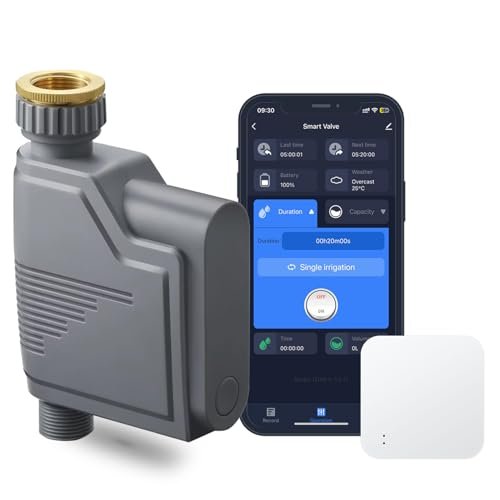
The Haozee Zigbee Smart Water Timer is designed to bring greater control to outdoor irrigation. It connects to a compatible Zigbee gateway and allows users to manage watering through an app, supported voice assistants, Home Assistant, or the timer's physical button. It also tracks estimated water consumption, records irrigation activity, and includes a configurable rain-delay function.
For gardeners who already use Tuya devices or Home Assistant with Zigbee2MQTT, this timer offers a flexible way to automate lawn, flowerbed, greenhouse, or container watering without relying exclusively on a cloud-connected Wi-Fi device.
What Is a Zigbee Smart Water Timer?
A smart water timer attaches between an outdoor faucet and a garden hose or irrigation line. An internal valve opens and closes according to schedules, app commands, automations, or manual input.
Unlike a conventional hose timer, this model communicates through Zigbee. The timer connects to a compatible Zigbee gateway, which then links it to an app or smart-home platform.
This arrangement can offer several advantages:
- Lower power consumption than many direct Wi-Fi devices
- Reliable communication within a Zigbee network
- App-based scheduling and remote control
- Integration with compatible sensors and automations
- Support for platforms such as Tuya and Home Assistant
A gateway is required for connected features. According to the product description, this package includes a compatible multi-protocol gateway, but buyers should verify the exact package contents before ordering.
Multiple Ways to Control Watering
One of the timer's strongest features is its range of control options. Users are not limited to a single app or interface.
App Control
After pairing the timer with a supported gateway, watering can be managed through the compatible mobile app. From the app, users can open or close the valve, create schedules, review irrigation history, and activate rain delay.
Remote access is particularly useful when plans change while you are away from home. You can adjust a watering schedule without physically visiting the faucet.
Voice Control
When connected through a compatible smart-home ecosystem, the timer can support voice commands. This may allow users to start or stop watering through an integrated voice assistant.
The exact commands and supported assistants depend on the selected gateway, app, account configuration, and smart-home platform.
Physical Button Control
A manual control button remains available on the device. This is useful when you are standing near the faucet and want to begin or stop watering without opening an app.
Manual control also provides a practical fallback for everyday garden work, such as washing tools or filling a watering can.
Irrigation Scheduling for Consistent Plant Care
Automated scheduling allows the timer to deliver water at planned times without requiring someone to operate the faucet manually.
A typical schedule might water a vegetable garden early in the morning, when temperatures are lower and evaporation is reduced. Container plants could use a shorter, more frequent schedule, while established landscaping may require deeper but less frequent watering.
Smart scheduling can be useful for:
- Lawns
- Flowerbeds
- Vegetable gardens
- Greenhouses
- Raised beds
- Drip irrigation systems
- Soaker hoses
- Container gardens
- Vacation watering
The best schedule depends on plant type, soil drainage, weather, and local watering restrictions. Automation should support good gardening practices rather than replace periodic inspection.
Water-Volume Monitoring
The Haozee timer is designed to estimate how much water passes through the device. This information can be viewed in the app, helping users understand how much water their irrigation system consumes.
Water-use monitoring can help identify whether a schedule is excessive, insufficient, or unexpectedly inconsistent. For example, a much higher reading than usual could indicate a longer watering cycle, an altered schedule, or a leak downstream from the timer.
This feature may help users:
- Compare water usage between schedules
- Estimate irrigation requirements
- Reduce unnecessary watering
- Track consumption over time
- Adjust watering for different garden zones
The reported volume should be treated as a management estimate rather than a certified utility measurement unless the manufacturer specifies metering accuracy.
Seven-Day Irrigation History
The app provides access to recent watering records, including approximately seven days of irrigation activity and water-consumption information.
This history can be useful when troubleshooting plant stress or reviewing whether scheduled watering occurred. Instead of relying on memory, users can confirm recent irrigation events and identify missed or unusually long cycles.
For a small garden, seven days may be enough to evaluate a weekly schedule. Users who require long-term seasonal reports may need to export data through a compatible platform or maintain separate records, depending on the available software features.
Rain Delay Helps Prevent Unnecessary Watering
Automated schedules can waste water when they continue running after rainfall. The timer includes a rain-delay mode that temporarily suspends normal irrigation.
Users can select a delay of:
- 24 hours
- 48 hours
- 72 hours
The rain-delay feature must be activated manually through the app unless it is incorporated into a separate automation. This gives the user direct control, but it also means the timer will not necessarily detect rainfall by itself.
When rain is expected, activating the delay can help prevent saturated soil, root stress, runoff, and unnecessary water consumption. Once the selected delay period ends, the normal schedule can resume.
Tuya Zigbee Ecosystem Compatibility
The timer can operate through a compatible Tuya Zigbee gateway. This makes it suitable for users who already manage Tuya-based smart devices through a supported application.
Within a compatible ecosystem, the water timer may be linked with other devices such as:
- Soil-moisture sensors
- Temperature and humidity sensors
- Rain sensors
- Weather-related automations
- Additional irrigation timers
For example, an automation could be designed to water only when soil moisture drops below a selected threshold. Actual automation options depend on the gateway, sensor compatibility, app capabilities, and firmware versions.
Home Assistant and Zigbee2MQTT Support
For users who prefer local smart-home management, the timer is also described as compatible with Home Assistant through Zigbee2MQTT.
This is an important feature for advanced users who want more control over automations, dashboards, historical data, and device interactions.
A Home Assistant installation may allow the timer to participate in automations based on:
- Soil moisture
- Local weather forecasts
- Rainfall sensors
- Temperature
- Time of day
- Watering restrictions
- Presence or vacation modes
Zigbee2MQTT compatibility can vary by device revision and firmware. Before purchasing specifically for Home Assistant, it is sensible to confirm that the exact model and exposed entities are supported by the current Zigbee2MQTT device database.
Gateway Requirements and Package Contents
The timer requires a Zigbee gateway for app connectivity, voice integration, and smart automation.
The product description states that it can work with:
- A compatible Tuya Zigbee gateway
- Home Assistant
- Zigbee2MQTT
It also states that the package includes a multi-protocol Zigbee and Bluetooth gateway. Because online listings sometimes offer multiple bundles, buyers should confirm whether the selected variation includes the hub or timer only.
Without a compatible gateway, the device may still offer limited physical control, but its app, remote-access, scheduling, monitoring, and automation features may not be fully available.
Installation Overview
Installing a smart hose timer is generally straightforward, but careful setup helps prevent leaks and connection problems.
A typical installation involves:
- Insert the required batteries if they are not already installed.
- Confirm that the faucet washer or sealing gasket is correctly seated.
- Attach the timer securely to the outdoor faucet.
- Connect the garden hose, drip line, or irrigation system to the outlet.
- Turn on the faucet and inspect both connections for leaks.
- Set up the included or compatible Zigbee gateway.
- Pair the timer through the selected app or Zigbee platform.
- Test manual valve operation before creating schedules.
Hand-tightening is generally preferable unless the manufacturer recommends a tool. Excessive force can damage plastic threads, seals, or the faucet connection.
Practical Irrigation Uses
Lawn Sprinklers
The timer can automate a hose-connected sprinkler for smaller lawn areas. Watering early in the morning can reduce evaporation and limit prolonged nighttime leaf moisture.
Drip Irrigation
Drip systems deliver water close to plant roots and can work particularly well with automated timers. A pressure regulator may be required depending on the irrigation components.
Raised Beds and Vegetable Gardens
Scheduled irrigation helps maintain consistent soil moisture, which is especially valuable during hot or dry periods.
Greenhouses
A connected timer can operate a basic greenhouse irrigation line, although moisture sensors and careful calibration are recommended to avoid overwatering.
Vacation Watering
Remote monitoring and scheduled irrigation can help maintain plants while occupants are away. The system should be tested thoroughly before relying on it during an extended trip.
Tips for More Efficient Watering
A smart timer is most useful when combined with thoughtful irrigation practices.
Water at the Right Time
Early morning is often a practical watering period because temperatures are cooler and wind is usually lighter. Local climate and regulations should still guide the final schedule.
Check Soil Moisture
Avoid assuming every scheduled cycle is necessary. Inspect the soil or use a compatible moisture sensor to determine whether plants actually need water.
Inspect for Leaks
Check hose connections, emitters, and downstream irrigation lines regularly. A timer can control the valve, but it cannot prevent water loss from damaged equipment after the outlet.
Adjust with the Seasons
Plants generally require different watering frequencies throughout the year. Review schedules after major changes in temperature or rainfall.
Use Rain Delay Proactively
The timer's rain delay must be enabled when needed. Check the forecast and activate it before expected rainfall, or create a Home Assistant automation if supported.
Common Mistakes to Avoid
Purchasing Without Confirming the Gateway
Zigbee devices require a compatible coordinator or hub. Verify that the selected package includes the gateway or that your existing system supports the timer.
Treating Water-Use Data as Utility-Grade Metering
The app's water-volume calculation is useful for irrigation management, but it may not offer the precision of a certified water meter.
Leaving the Faucet Closed
The outdoor faucet generally needs to remain open for the timer's internal valve to control water flow. After installation, test that the timer can start and stop water reliably.
Ignoring Freezing Temperatures
Outdoor hose timers should usually be removed and stored before freezing weather unless the manufacturer explicitly rates them for winter operation. Water trapped inside can freeze and damage the valve body.
Creating a Schedule Without Testing Flow
Different hoses, emitters, sprinklers, and water pressures produce different results. Measure the actual coverage before relying on an automated duration.
Advantages and Considerations
Advantages
- App-based irrigation control
- Compatible voice-control options
- Physical button for manual watering
- Water-volume estimates through the app
- Recent irrigation and consumption history
- Configurable 24-, 48-, or 72-hour rain delay
- Tuya Zigbee ecosystem support
- Home Assistant and Zigbee2MQTT compatibility
- Potential integration with soil and environmental sensors
- Suitable for lawns, gardens, greenhouses, and drip systems
- Gateway reportedly included with the listed package
Potential Considerations
The timer requires a compatible Zigbee gateway for full functionality. Rain delay is manually activated unless the user creates an external automation. Water-use figures may be estimates rather than billing-grade measurements, and Home Assistant compatibility should be verified for the exact hardware revision.
Like all outdoor irrigation equipment, the timer also requires seasonal maintenance, leak inspection, and protection from freezing conditions.
Frequently Asked Questions
Does this water timer connect directly to Wi-Fi?
No. It uses Zigbee and requires a compatible Zigbee gateway. The gateway provides connectivity to the app or smart-home platform.
Is a gateway included?
The supplied description states that the product comes with a multi-protocol gateway. Confirm the contents of the selected package before ordering because different bundles may be available.
Can it work with Home Assistant?
The timer is described as supporting Home Assistant through Zigbee2MQTT. Confirm exact model compatibility and available controls before purchase.
Can I control it without the app?
Yes. The timer includes a physical button for manual operation. Full scheduling, monitoring, remote access, and automation require a compatible gateway.
Does the timer detect rain automatically?
The built-in rain-delay function must be activated by the user. Automatic weather-based control may be possible through compatible sensors or Home Assistant automations.
How long can watering be delayed?
The app provides selectable rain-delay periods of 24, 48, or 72 hours.
Can it measure water consumption?
The timer calculates and displays water-use information in the app. This can help compare irrigation cycles, although the figures should be treated as estimates unless a specific accuracy certification is provided.
Can it connect to soil-moisture sensors?
Within a compatible Tuya or Home Assistant ecosystem, the timer may be linked with supported soil-moisture and environmental sensors. Available automations depend on the gateway and software configuration.
Final Thoughts
The Haozee Zigbee Smart Water Timer is a capable irrigation controller for users who want more flexibility than a basic programmable hose timer can provide. App control, voice integration, physical operation, water-use estimates, irrigation history, and rain delay make it suitable for a wide range of lawn and garden applications.
Its strongest appeal is smart-home compatibility. Tuya users can integrate it into an existing Zigbee environment, while Home Assistant enthusiasts may use Zigbee2MQTT to build more advanced local automations based on soil conditions, weather, or household routines.
The need for a compatible gateway adds another setup requirement, and buyers should verify exactly what is included in the selected package. Once properly configured, however, the timer can provide a convenient and adaptable way to manage irrigation, reduce unnecessary watering, and maintain more consistent plant care.