Govee WiFi Water Leak Detector Review: Real-Time Alerts, 100 dB Alarm, and Multi-Sensor Coverage
A water leak can start quietly and become expensive long before anyone notices it. A dripping pipe under a sink, a leaking washing-machine hose, an overflowing sump area, or a failed water heater connection can release enough water to damage flooring, cabinets, drywall, and nearby rooms.
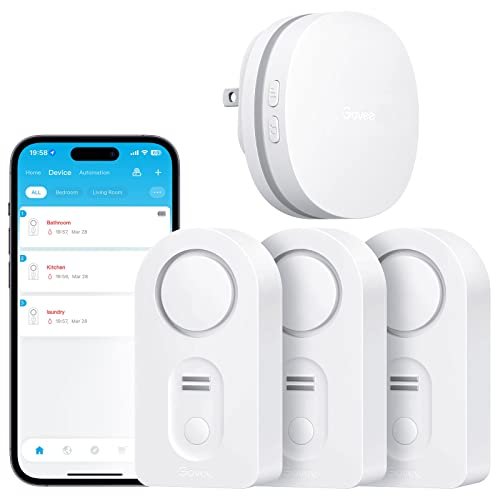
The Govee WiFi water leak detector system is designed to provide both local and remote warning. It combines compatible water sensors with a WiFi gateway, allowing users to receive app notifications and other alerts when a leak is detected. The sensors also include a loud built-in alarm, so the system can still provide an immediate warning to anyone nearby.
A single gateway can support up to 10 compatible Govee H5054 sensors, making the system suitable for monitoring several leak-prone areas throughout a home. For homeowners who want more coverage than a single standalone alarm can provide, this type of multi-sensor setup offers a practical middle ground between basic leak detectors and more expensive automatic shutoff systems.
What Is the Govee WiFi Water Leak Detector System?
The system consists of a WiFi gateway and compatible water leak sensors.
The sensors are placed near plumbing fixtures, appliances, or other locations where water should not normally accumulate. When one detects moisture, it can sound a local alarm and communicate the event to the gateway.
The gateway then connects the system to the internet so alerts can be delivered remotely.
This setup provides several layers of awareness:
- Local audible alarm
- App notifications
- Remote alerts
- Sensor-specific identification
That combination can be especially useful when nobody is standing near the leak.
How the Leak Detection System Works
The basic process is straightforward.
When water reaches one of the sensor probes:
- The sensor detects moisture.
- Its local alarm activates.
- The sensor communicates with the gateway.
- The gateway sends the event through the connected network.
- The homeowner receives a remote notification.
Because multiple sensors can connect to the same gateway, each location can be monitored independently while still appearing in one system.
Real-Time App Notifications
One of the main advantages over a basic water alarm is remote notification.
If a leak occurs while you are:
- At work
- Traveling
- Sleeping
- Away for the weekend
- Managing another property
the gateway can send an alert to your phone rather than relying only on the built-in siren.
This can reduce the amount of time a leak remains unnoticed.
Email and App Alert Options
The supplied product information describes multiple notification methods, including app alerts and email.
Having more than one notification channel can be useful because it provides redundancy.
If one alert is missed, another may still reach the user.
The exact notification options available can depend on the current Govee app and service configuration, so users should verify their alert settings after installation.
Up to 10 Sensors per Gateway
The gateway supports up to 10 water leak sensors according to the product description.
That makes it possible to create a distributed monitoring system throughout the home.
For example, sensors could be placed near:
- Water heater
- Washing machine
- Dishwasher
- Kitchen sink
- Bathroom vanity
- Toilet
- Sump pump
- Refrigerator water line
One gateway can then monitor all of them.
Why Multi-Sensor Coverage Matters
A single water alarm only protects one physical area.
A detector in the laundry room cannot identify a leak under the kitchen sink.
Water problems can occur anywhere plumbing is present, so spreading several sensors across the home provides much better coverage.
The ability to add sensors gradually also makes the system flexible.
You can start with the highest-risk areas and expand later.
Important Sensor Compatibility Requirement
The gateway is specifically designed to pair with Govee H5054 sensors according to the supplied information.
That means users should not assume that every Govee water detector will work with the same gateway.
Before purchasing additional sensors, verify the exact model number.
Compatibility mistakes are easy to make when several similar-looking products exist within the same brand ecosystem.
2.4 GHz WiFi Required
The gateway supports 2.4 GHz WiFi.
It does not support 5 GHz connections according to the source.
This is common among smart-home devices because 2.4 GHz generally offers:
- Longer wireless range
- Better penetration through walls
- Wider compatibility
Most modern routers support both 2.4 GHz and 5 GHz, but setup can occasionally require connecting the phone to the correct band.
What If Your Router Combines 2.4 GHz and 5 GHz?
Many newer routers use one network name for both frequencies.
In some cases, setup works automatically.
If pairing fails, useful troubleshooting steps can include:
- Temporarily separating the WiFi bands
- Connecting your phone to 2.4 GHz during setup
- Disabling band steering temporarily
- Following the router manufacturer's IoT setup instructions
Once the gateway is connected, the individual leak sensors do not each need a direct WiFi connection.
Drip Detection and Floor Leak Detection
The sensor uses multiple detection probes.
The supplied description mentions:
- Two groups of rear or bottom water-detection probes
- One group of front probes
This allows the sensor to detect different leak patterns.
That is useful because water does not always arrive from the same direction.
Detecting Drips Before a Puddle Forms
A leak may begin as a slow drip from:
- Pipe fitting
- Faucet connection
- Supply hose
- Roof penetration
If a sensor can detect water reaching its front probe before a full puddle forms underneath it, it may provide an earlier warning.
That can be useful beneath sinks or near vertical plumbing connections.
Detecting Water on the Floor
Bottom probes are designed to detect water that accumulates underneath the sensor.
This is the more traditional water-alarm function.
It works well for:
- Appliance leaks
- Water heater failures
- Toilet leaks
- Flooding around a sump
- Overflowing fixtures
For best results, place the detector where water is likely to collect first.
Custom Sensor Names in the App
One particularly useful feature in multi-sensor systems is the ability to name each detector.
Instead of receiving a generic "water detected" message, users can assign names such as:
- Basement Water Heater
- Laundry Room
- Kitchen Sink
- Upstairs Toilet
- Dishwasher
This makes it much easier to identify the affected area immediately.
Why Naming Sensors Matters
When a leak alarm occurs, response time matters.
If the system only reports "Sensor 6," you may need to open the app and figure out where that sensor is located.
A descriptive name tells you immediately which area needs attention.
This becomes increasingly important as more sensors are added.
100 dB Local Alarm
The sensor includes a local alarm rated at up to approximately 100 dB.
That is intended to be loud enough to attract attention from nearby rooms.
A strong local alarm is useful because remote connectivity is not always available.
If someone is home, the siren may provide the fastest warning.
Adjustable Volume Levels
The product provides three volume settings.
This allows the alarm level to be adapted to the installation.
For example:
Higher Volume
Useful in:
- Basements
- Garages
- Utility rooms
Lower Volume
May be more appropriate in:
- Small apartments
- Bedrooms
- Bathrooms
The important thing is to choose a setting loud enough to be heard from nearby occupied areas.
Mute Button for Easier Response
Once the leak has been found, the alarm can be silenced using the mute button.
This is a practical feature because a 100 dB alarm can become distracting while the user is:
- Inspecting plumbing
- Cleaning up water
- Turning off a valve
- Calling a plumber
Muting the alarm does not solve the underlying leak, so the source should still be addressed immediately.
Best Places to Install the Sensors
Water sensors work best when installed close to likely leak points.
Good locations include:
- Water heaters
- Washing machines
- Dishwashers
- Under kitchen sinks
- Under bathroom vanities
- Toilets
- Sump pumps
- Refrigerators with water lines
The exact placement matters more than simply putting a detector somewhere in the room.
Water Heater Monitoring
Water heaters can leak from:
- Tank corrosion
- Drain valves
- Supply connections
- Relief piping
- Nearby fittings
A sensor beside the tank or inside an appropriate drain pan can provide early warning.
This is especially important when the heater is located in a finished basement or upper floor.
Washing Machine Leak Protection
Washing-machine plumbing can fail at:
- Hot-water hose
- Cold-water hose
- Drain hose
- Internal pump
- Appliance seals
A sensor positioned behind or beside the machine can detect water before it spreads far.
Second-floor laundry areas can particularly benefit from early leak alerts.
Dishwasher Leak Detection
Dishwasher leaks may remain hidden behind cabinets.
Potential sources include:
- Supply lines
- Drain hoses
- Pumps
- Door seals
A sensor placed where water is likely to escape can help identify a problem before cabinets or flooring become extensively wet.
Under-Sink Monitoring
Kitchen and bathroom sink cabinets frequently hide small leaks.
Possible sources include:
- Faucet hoses
- P-traps
- Shutoff valves
- Garbage disposals
A water sensor at the bottom of the cabinet can provide warning before moisture spreads beyond the enclosure.
Toilet Leak Detection
Toilet leaks can originate from:
- Supply connection
- Shutoff valve
- Tank bolts
- Fill-valve fittings
- Base seal
Place the sensor where water is likely to reach it, but avoid locations that regularly become wet during cleaning.
Basement and Sump Monitoring
Basements are another useful application.
Sensors can monitor areas near:
- Sump pits
- Utility sinks
- Main water lines
- Water heaters
- Boilers
A loud local alarm can be especially valuable in these spaces because leaks may otherwise remain unnoticed.
Gateway-Based System vs. Direct WiFi Sensors
There are two common smart leak detector designs.
Gateway-Based System
Sensors communicate with a central gateway.
Advantages include:
- Easier multi-sensor management
- Fewer direct WiFi devices
- Centralized notifications
Direct WiFi Sensor
Each sensor connects directly to WiFi.
Advantages include:
- No separate hub
- Simpler for one or two sensors
For several detectors around a house, the gateway architecture can be more convenient.
Govee Leak Sensors vs. Standalone Audible Alarms
Standalone water alarms are inexpensive and simple.
Their main weakness is that they only warn people who are close enough to hear them.
The Govee system adds:
- Remote notifications
- Multi-sensor monitoring
- Sensor naming
- App management
This makes it more suitable for homeowners who spend significant time away from home.
Does This System Automatically Shut Off the Water?
No automatic water shutoff valve is described in the supplied information.
The system is designed primarily to:
- Detect water
- Sound an alarm
- Send notifications
Someone still needs to:
- Shut off the water
- Stop the appliance
- Repair the leak
Users who want automatic intervention would need a separate compatible shutoff system.
Leak Detection vs. Automatic Shutoff
Leak Detector
Provides early warning.
Automatic Shutoff System
Can physically close the water supply after detection.
For high-risk properties, combining both can provide stronger protection.
Test the System After Installation
Do not assume the sensors work simply because they appear in the app.
Perform a controlled test according to the manufacturer's instructions.
Verify:
- Water detection
- Local alarm
- Gateway communication
- App notification
- Email alert if enabled
This confirms that the entire alert path works correctly.
Check Smartphone Notification Settings
After pairing the system, verify that your phone allows the Govee app to send notifications.
Check:
- App notification permission
- Background activity
- Battery optimization settings
- Do Not Disturb configuration
A connected sensor is much less useful if the phone silently blocks every alert.
Common Setup Mistakes
Using 5 GHz WiFi
The gateway requires 2.4 GHz.
Buying the Wrong Expansion Sensor
Only compatible H5054 sensors should be added.
Placing Sensors Too Far From Leak Sources
Water must physically reach the detection probes.
Never Testing Alerts
Always verify the full system.
Leaving Sensors Unnamed
Descriptive names make emergencies easier to locate.
Assuming the System Stops Water Automatically
It provides alerts but does not include a shutoff valve.
How Many Sensors Should You Use?
The right number depends on the house.
A practical starting plan might cover:
- Water heater
- Washing machine
- Kitchen sink
- Dishwasher
- Main bathroom
Additional sensors can then be added for:
- Other bathrooms
- Sump pump
- Refrigerator
- Utility room
The gateway's 10-sensor capacity gives most homes enough room for broad coverage.
Who Is This Govee Leak Detector System Best For?
This system may be suitable for:
- Homeowners
- Renters
- Multi-floor homes
- Finished basements
- Vacation properties
- Rental properties
- Users already in the Govee ecosystem
It is especially useful for people who want several leak sensors managed from one gateway.
Advantages and Considerations
Advantages
- Real-time remote notifications
- App and email alerts
- Up to 10 sensors per gateway
- Drip and floor leak detection
- Custom sensor names
- 100 dB local alarm
- Three adjustable volume levels
- Mute button
- Centralized gateway architecture
- Suitable for many household leak-prone areas
Potential Considerations
The gateway only supports 2.4 GHz WiFi.
Only Govee H5054 sensors are listed as compatible for expansion.
Remote alerts depend on network and internet availability.
The system does not automatically shut off the water.
Correct sensor placement is critical.
Frequently Asked Questions
Does this system send phone notifications?
Yes. The gateway can send remote app alerts when a connected sensor detects water.
Does it support email alerts?
Email notifications are listed in the supplied product description.
How many sensors can one gateway support?
Up to 10 compatible sensors.
Which sensor model is compatible?
The supplied information specifies Govee H5054 sensors.
Does the gateway support 5 GHz WiFi?
No. It requires 2.4 GHz WiFi.
Can the sensor detect dripping water?
Yes. It includes probes designed for drip and leak detection.
Can it detect water on the floor?
Yes.
How loud is the alarm?
The local alarm is rated at up to approximately 100 dB.
Can the volume be adjusted?
Yes. Three alarm levels are provided.
Can the alarm be muted?
Yes. A mute button is included.
Can I name each sensor?
Yes. Sensor names can be customized in the app according to their locations.
Does it shut off the water automatically?
No automatic shutoff valve is described.
Final Thoughts
The Govee WiFi water leak detector system provides a practical way to monitor several leak-prone areas of a home from one connected gateway.
Its main strength is centralized multi-sensor coverage. Up to 10 compatible H5054 sensors can be distributed around water heaters, washing machines, sinks, toilets, dishwashers, basements, and other vulnerable locations. Local 100 dB alarms provide immediate warning nearby, while remote app and email notifications help homeowners respond when they are away.
The drip and floor-level probes also make the sensors more versatile than alarms designed only to detect standing water.
The main limitation is that this is a detection system rather than an automatic shutoff solution. It can tell you that a leak has occurred, but someone still needs to stop the source.
For homeowners looking for a multi-sensor Govee water leak alarm system with real-time smartphone notifications, a loud local alarm, and centralized 2.4 GHz WiFi gateway control, it offers a useful early-warning layer against household leaks.